Backlink Monitoring: How to Track, Protect, and Grow Your Link Profile
Backlinks remain one of the strongest ranking signals in Google’s algorithm — but building them is only half the job. If you’re not actively monitoring your backlink profile, you’re flying blind. Links get removed, turned nofollow, replaced by spammy ones, or simply rot away without you ever knowing.
Backlink monitoring is the practice of continuously tracking every link pointing to your site: new ones appearing, existing ones disappearing, and toxic ones threatening your rankings. Without it, weeks of outreach work can evaporate overnight with zero visibility into why your rankings drop.
This guide covers everything you need to know — from setting up proper backlink monitoring to recovering lost links, disavowing toxic backlinks, and spying on your competitors’ link acquisition strategies.
Quick Takeaways
- Backlink monitoring tracks new, lost, and changed links pointing to your site in real time — without it, you can’t protect or scale your link building.
- Lost high-value backlinks should trigger immediate outreach; recovering even one DR 70+ link can meaningfully move rankings.
- Toxic and spammy backlinks can trigger manual penalties — identifying and disavowing them is a necessary part of link profile hygiene.
- Nofollow vs. dofollow status, anchor text distribution, and referring domain diversity all need to be monitored, not just raw link counts.
- Competitive backlink monitoring reveals exactly where rivals are earning links so you can replicate or outpace their strategy.
- Nightwatch lets you track all of this in one place and correlate backlink changes directly with keyword ranking movements.
Table of Contents
- What Is Backlink Monitoring and Why Does It Matter?
- Types of Backlinks to Monitor
- How to Set Up Backlink Monitoring in Nightwatch
- Tracking New and Lost Backlinks
- What to Do When You Lose a High-Value Backlink
- Identifying and Disavowing Toxic Links
- Competitive Backlink Monitoring
- Setting Up Backlink Alerts
- Measuring Backlink Impact on Rankings
- FAQ
What Is Backlink Monitoring?
Backlink monitoring is the ongoing process of tracking all inbound links pointing to your website — who’s linking to you, from where, with what anchor text, and whether those links are still live. It goes beyond a one-time audit; it’s a continuous surveillance of your link profile over time.
At its core, backlink monitoring answers four questions:
- Who just linked to me? (new link discovery)
- Which links have I lost? (lost link detection)
- Are any of my links harmful? (toxic link identification)
- How are my competitors building links? (competitive intelligence)
Why Backlink Monitoring Matters for Rankings
Google’s algorithm still weights backlinks heavily as a proxy for authority and trust. According to Ahrefs’ study of over one billion web pages, 90.63% of pages get zero organic traffic from Google — and one major differentiator between the top-ranked pages and the rest is the quality and quantity of their backlink profiles.
But links are dynamic, not static. A Forbes link you earned two years ago might have been removed during a site redesign. A guest post from a high-DA site might have been taken offline. A link farm might have started pointing hundreds of spammy links at you without your knowledge. None of this is visible unless you’re actively monitoring.
Without backlink monitoring:
- You lose link equity silently and can’t act to recover it
- Toxic links accumulate and risk a Google manual penalty
- Competitors build links from sources you don’t know exist
- You can’t accurately attribute ranking changes to link building efforts
With proper backlink monitoring tied to your rank tracking, you get a closed feedback loop: build links → see rankings improve → detect when links are lost → act to recover them.
Types of Backlinks to Monitor
Not all backlinks are equal — and not all deserve equal attention. Here’s what to watch.
New Backlinks
Every new link to your site is a data point. When monitored in near real-time, new backlinks tell you:
- Which content is attracting organic mentions
- Whether your outreach campaigns are generating results
- If journalists or bloggers are referencing your brand
Spikes in new links from low-quality domains can also be an early warning sign of a negative SEO attack.
Lost Backlinks
A lost backlink is any link that has gone offline, been removed from the linking page, or changed its destination URL. Lost links are often the hidden cause behind unexplained ranking declines. Common reasons a link gets lost:
- The linking page was deleted or redirected
- Your URL changed without a proper redirect in place
- The webmaster removed the link (often after site redesigns)
- The page was deindexed by Google
Toxic and Spammy Backlinks
Toxic backlinks come from low-authority, penalized, or irrelevant sites — link farms, PBNs, scrapers, and adult or gambling sites that linked to you without solicitation. A buildup of these can trigger a Google manual penalty or algorithmic demotion.
Key signals of a toxic backlink:
- Domain Authority (DA) / Domain Rating (DR) near zero
- No organic traffic on the referring domain
- Exact-match commercial anchor text at unnatural volume
- Site irrelevant to your niche
Nofollow vs. Dofollow Links
Dofollow links pass PageRank and directly contribute to your authority. Nofollow links (rel=“nofollow”) tell Google not to pass link equity. While Google has acknowledged it may still use nofollow links as hints, dofollow links are the ones that move rankings.
You need to monitor:
- Whether a previously dofollow link has been switched to nofollow
- The overall ratio of dofollow to nofollow in your profile (a healthy profile has a mix, but should skew dofollow for backlinks you’ve worked to earn)
Anchor Text Distribution
Over-optimized anchor text (e.g., 80% of your links using the exact keyword “buy cheap SEO tools”) is a Penguin-era penalty trigger. A natural profile has a mix of branded, naked URL, partial-match, and exact-match anchors. Monitoring anchor distribution lets you catch manipulation — by you or against you.
Referring Domain Diversity
One hundred links from one domain counts far less than ten links from ten different domains. Monitoring referring domain growth (or loss) is a better signal of link profile health than total link count.
How to Set Up Backlink Monitoring in Nightwatch
Nightwatch automatically discovers and tracks backlinks for any URL you add to your account. Here’s how to get fully set up.
Step 1: Add Your Website
In Nightwatch, add your root domain as a URL to track. The platform will begin crawling and indexing backlinks pointing to your domain.
Step 2: Configure Backlink Discovery
Nightwatch pulls backlinks from its own index and continuously recrawls known backlinks to detect status changes. You can also manually add specific backlinks you want to monitor — useful for high-value links you’ve manually acquired through outreach.
Step 3: Set Up Backlink Segments
Segmenting your backlinks lets you analyze the performance of specific subsets:
- By acquisition type: Outreach links vs. organic mentions vs. directory listings
- By quality tier: High DR (60+), medium DR (30–59), low DR (<30)
- By anchor text: Branded, exact-match, partial-match, generic
- By target page: Homepage links vs. deep page links
Segmenting is especially valuable when you want to correlate specific link-building activities with ranking changes in Nightwatch’s graph view.
Step 4: Connect to Your Rank Tracking
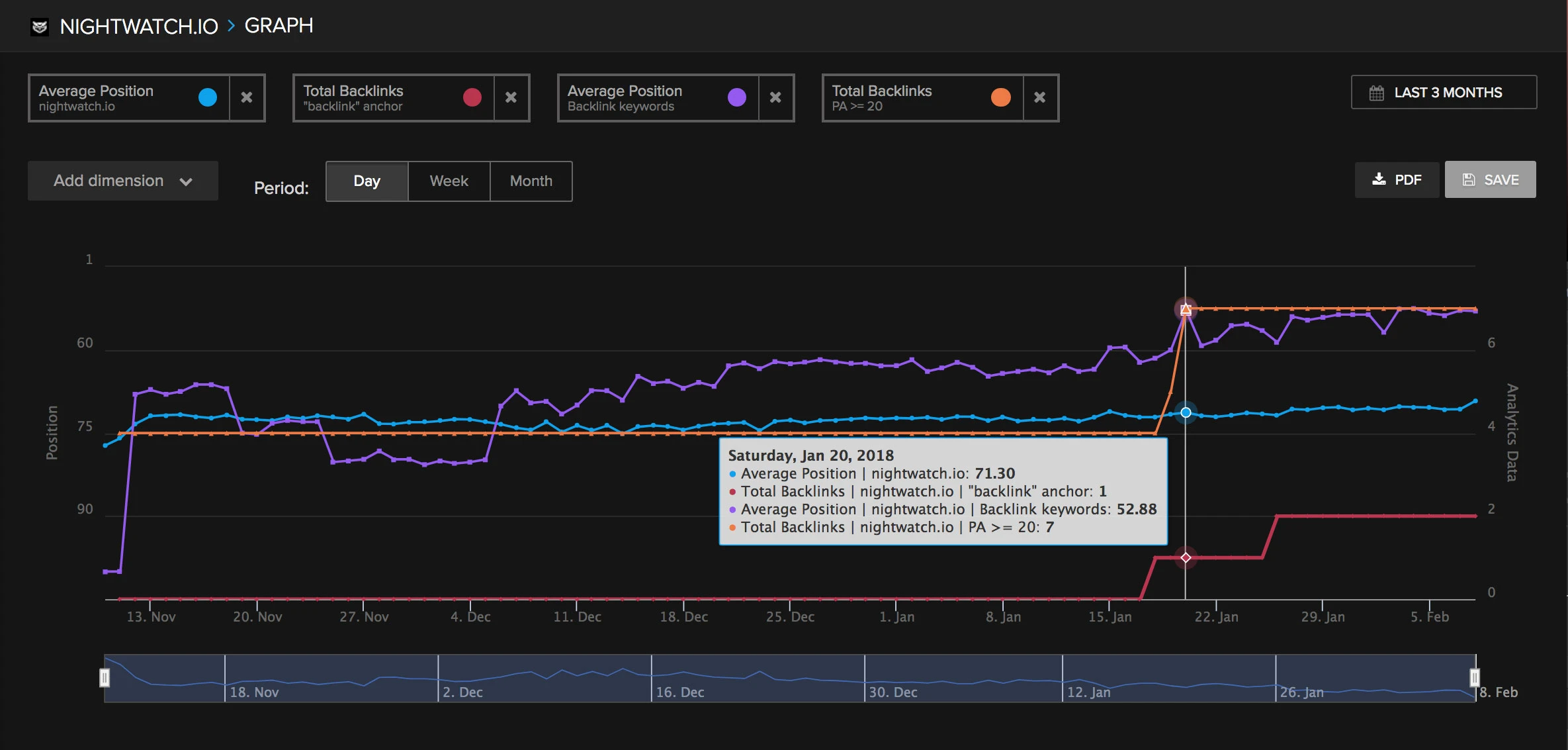
The real power of backlink monitoring comes from viewing backlink data alongside your rank tracking data. In Nightwatch, you can overlay backlink events on ranking timelines to see exactly when a new link appeared and how rankings responded in the days that followed.
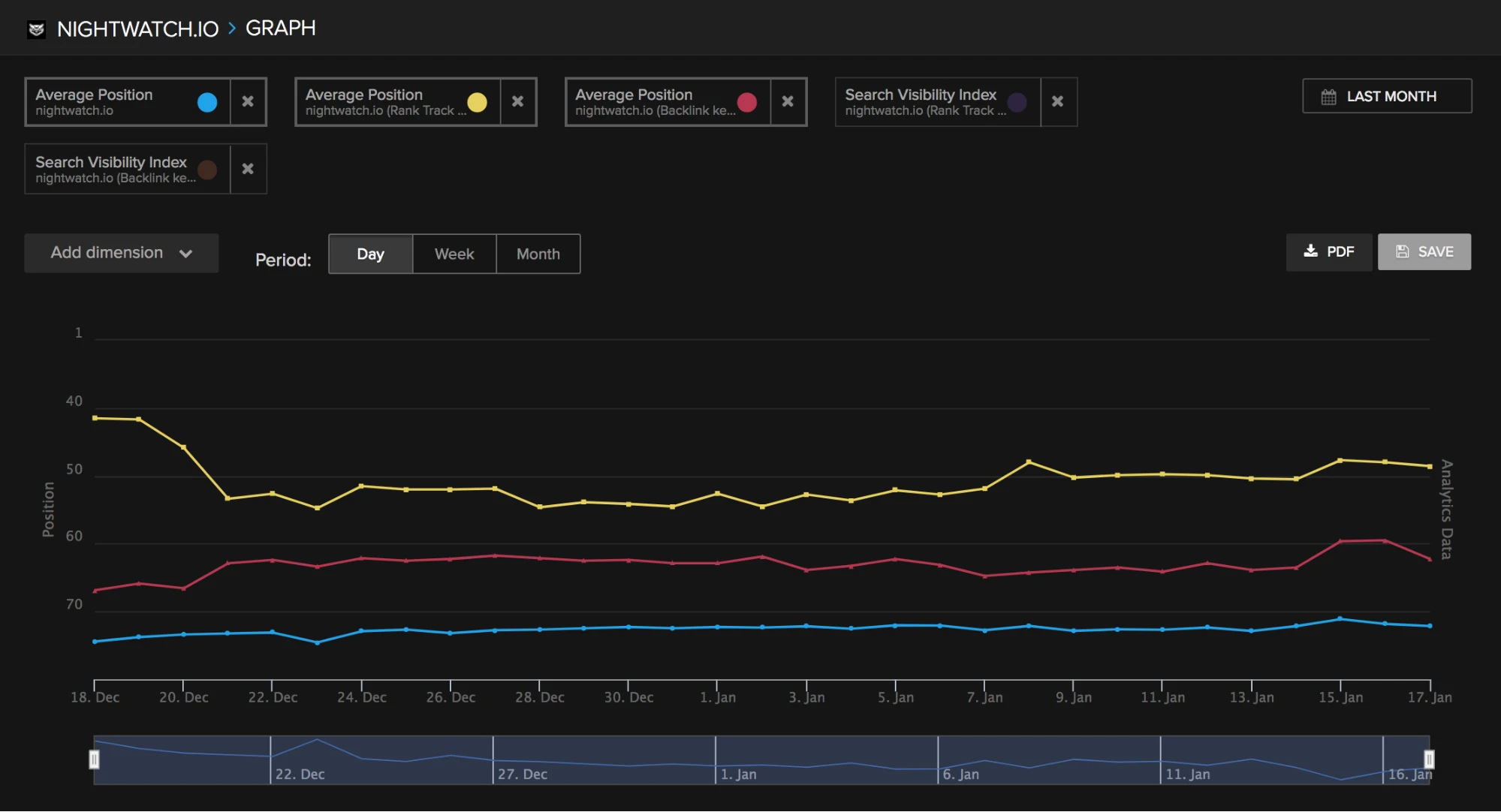
In the graph above, you can see ranking spikes correlating with new backlink acquisition — the kind of insight that’s impossible without integrated monitoring.
Tracking New and Lost Backlinks
Monitoring New Links
In Nightwatch’s backlink dashboard, new links appear flagged with a “New” status and their discovery date. For each new backlink you’ll see:
- Source URL and domain
- Target URL on your site
- Anchor text used
- DA/DR of the linking domain
- Link type (dofollow/nofollow)
- First detected date
Sort by discovery date to see what’s arrived since your last review. Pay attention to new links from high-DR domains — these are worth noting in your ranking timeline.
Detecting Lost Backlinks
Nightwatch recrawls all known backlinks regularly. When a backlink disappears — whether the page 404s, the link is removed, or the page redirects elsewhere — it’s flagged with a “Lost” status.
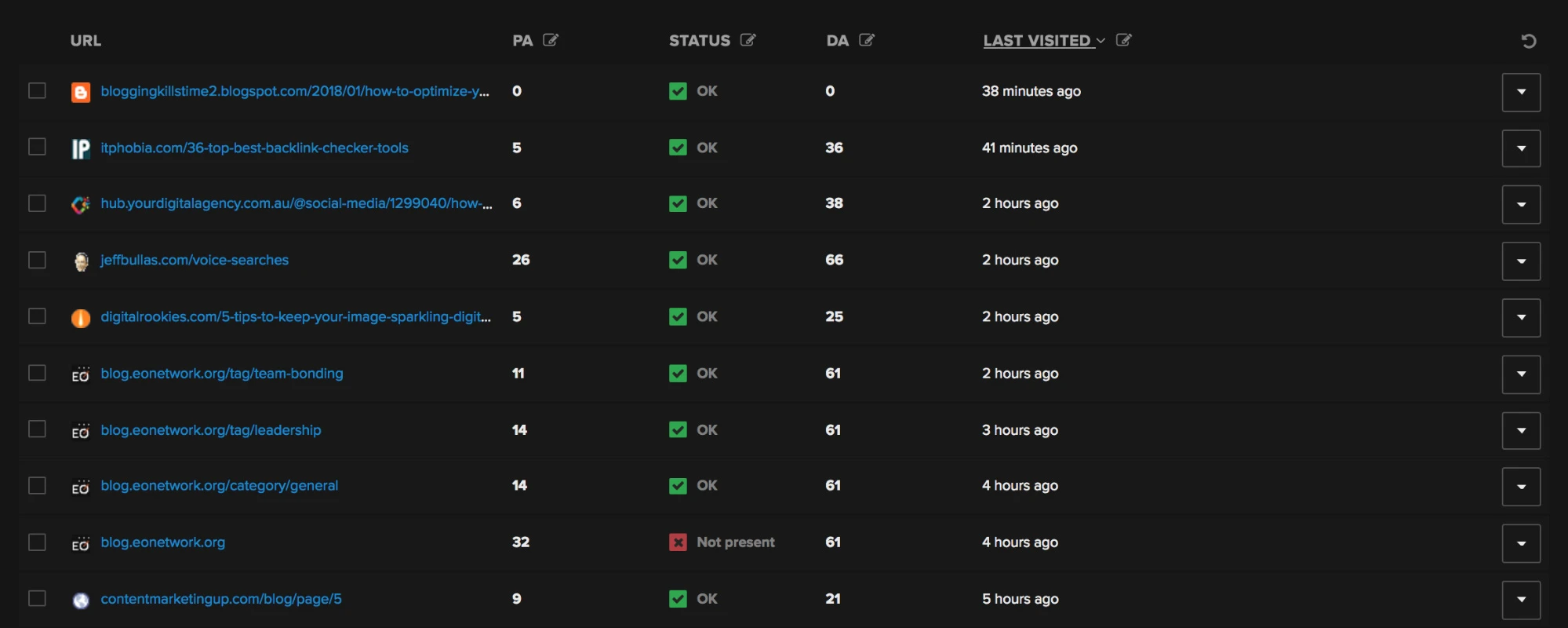
To find your lost links quickly: filter by Status = “Lost” and sort by the referring domain’s DR descending. Your highest-priority recovery targets are at the top — high-DR domains that previously linked to you.
Tracking Backbone Backlinks
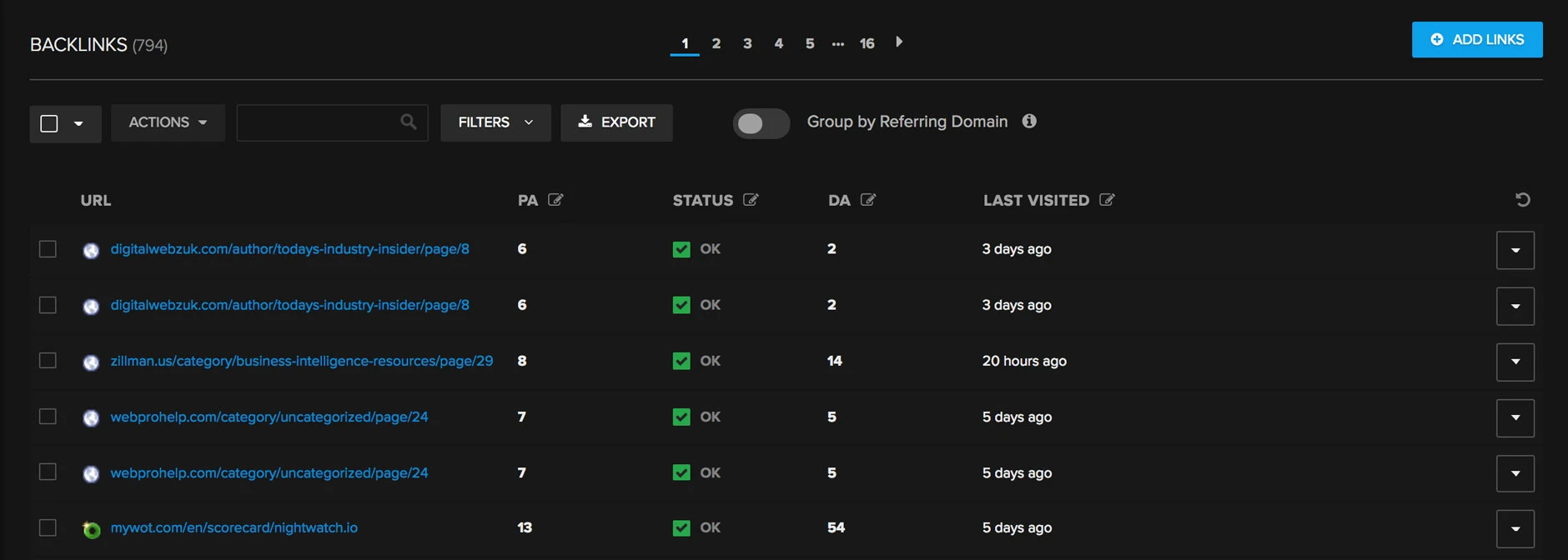
Every site has a handful of “backbone” backlinks — cornerstone links from authoritative sources that disproportionately contribute to your authority. These might be links from industry publications, government or university sites, or major media outlets.
These deserve dedicated monitoring. Add them manually if needed, and check their live status regularly. Nightwatch will alert you if their status changes — whether the link goes offline, changes from dofollow to nofollow, or the anchor text is modified.
What to Do When You Lose a High-Value Backlink
Losing a DR 70+ link can noticeably impact rankings, sometimes within weeks. Don’t accept the loss passively — most lost links are recoverable with a simple outreach email.
Step 1: Diagnose Why the Link Was Lost
Before reaching out, understand what happened:
- 404 on the linking page → The page was deleted or moved. Check if there’s a newer version of the article where you could be re-added.
- Link removed but page still live → The webmaster actively removed your link. Check if the page was updated — you may have been replaced by a competitor.
- Nofollow added → Less urgent, but worth addressing if the link was previously passing equity.
- Your target URL changed → The link may still exist but points to a broken URL on your site. Fix the redirect first.
Step 2: Find the Right Contact
For guest posts or placements you arranged: go back to the original contact. For organic links where you don’t have a contact: use the site’s contact page or look up the author via LinkedIn.
Step 3: Write a Recovery Email
Keep it short, specific, and non-accusatory. Example:
Hi [Name],
I noticed that the link to [your page] from [their article URL] seems to have been removed recently. We really appreciated the mention — that article is one of our most referenced resources on [topic].
Would you be open to reinstating the link? Happy to discuss if there’s any issue with the content it was pointing to.
Thanks, [Your name]
Recovery rates vary, but for legitimate links (guest posts, editorial mentions), a polite follow-up recovers 20–40% of lost links in our experience. Given the effort it took to earn the link in the first place, even a 20% recovery rate is well worth the effort.
Step 4: Update Your Internal Redirect Structure
If your own URL changes caused the lost links, implement 301 redirects from the old URL to the new one. This preserves most of the link equity and means you don’t need to reach out to every linking site.
Identifying and Disavowing Toxic Links
A toxic backlink profile doesn’t happen overnight — it builds up gradually from link spam, competitor negative SEO, or old-school manipulative link building. Here’s how to identify and neutralize it.
Signals of a Toxic Backlink
Filter your backlinks in Nightwatch by DA/DR and look for the low-end outliers. Cross-reference with these red flags:
- DA/DR < 5 with no organic traffic — almost certainly a link farm or scraper site
- Irrelevant site category — casino links pointing to an SaaS blog
- Exact-match commercial anchors at scale — 50 links all saying “buy backlinks cheap”
- Foreign-language sites with no obvious content — typical of PBN spam
Building a Disavow File
Once you’ve identified toxic links, export them from Nightwatch and compile a disavow file. Google’s disavow file format requires one URL or domain per line:
# Toxic link farms - disavow entire domain
domain:spammy-linkfarm.com
domain:casino-spam-site.ru

# Specific toxic URLs
https://another-bad-site.com/stuffed-anchor-spam-page
For domains where the entire site is garbage, use domain: to disavow all links from that domain. For sites that are mostly legitimate but have one bad page, disavow the specific URL.
Submitting to Google Search Console
Upload your disavow file via Google Search Console’s Disavow Links Tool. Google will typically process it within a few weeks, after which those links will no longer be attributed to your site.
Important: disavowing is a heavy-handed tool. Google advises using it only if you have clear evidence of unnatural links that could cause a manual penalty. Don’t disavow legitimate low-DA links just because the site is small — that’s normal for a healthy organic profile.
Competitive Backlink Monitoring
Your competitors’ backlink profiles are one of the richest sources of link building intelligence available to you. Finding and analyzing competitor backlinks can surface dozens of link opportunities you’d never find through keyword research alone.
Why Monitor Competitor Backlinks?
- Gap analysis: Links your competitors have that you don’t are proven opportunities — the site has already linked out to content like yours.
- Trend detection: If a competitor suddenly gains 50 high-DR links in a week, something noteworthy happened (a PR mention, a viral piece, an interview) — and you can often get in front of the same sources.
- Pattern recognition: Understanding which types of content earn links in your niche (data studies, tools, guides) informs your content strategy.
Setting Up Competitor Monitoring in Nightwatch
In Nightwatch, you can add competitors to your tracked URL and view their backlink profiles alongside your own. This lets you:
- See which domains link to them but not to you
- Track when they earn new high-value links
- Monitor their referring domain growth trend vs. yours
For deeper SEO competitor analysis, combine competitor backlink data with their keyword rankings to understand which links are actually moving their rankings on specific terms.
Replicating Competitor Links
When you find a high-DR site that has linked to a competitor, your path forward depends on the link type:
- Guest post → Pitch the same publication with a fresh angle
- Resource page inclusion → Email the webmaster pointing out your (better or complementary) resource
- Editorial mention → Create content worthy of the same mention, then do targeted outreach
- Directory listing → Submit your site to the same directory
Track which outreach attempts convert by tagging those links in Nightwatch — when the links appear, you’ll be able to see their ranking impact directly.
Setting Up Backlink Alerts
Manual backlink reviews are valuable but can’t catch changes in real time. Alerts let you respond to important events — a major new backlink or a sudden loss — within hours rather than weeks.
What to Alert On
New backlink alerts:
- New link from a domain with DR 50+ → high-priority notification, log it, and correlate with ranking movements
- New link with exact-match commercial anchor → review for over-optimization risk
- Sudden spike in new links (10+ in 24 hours) → possible viral content or negative SEO attack
Lost backlink alerts:
- Lost link from DR 60+ domain → trigger recovery outreach immediately
- Lost link from a page you control (e.g., guest post you wrote) → check if the page still exists
Status change alerts:
- Dofollow changed to nofollow → evaluate whether to reach out to the webmaster
- Backbone backlink goes offline → immediate priority to recover
Connecting Backlink Changes to SERP Monitoring
Backlink changes are most valuable when viewed in context with SERP monitoring. When a major backlink goes live or is lost, check your SERP positions for your target keywords in the following 2–4 weeks. Ranking changes that coincide with backlink events help you quantify the actual value of specific links.
Measuring Backlink Impact on Rankings
The ultimate goal of backlink monitoring isn’t just to catalog links — it’s to understand which links actually move rankings so you can prioritize building more of them.
Segmenting Backlinks for Impact Analysis
The most effective approach is to create backlink segments that align with your keyword segments, then compare their trends on the same timeline.
Example: if you’re targeting “running shoes” and related keywords:
- Create a keyword segment for all “running shoes” keywords
- Create a backlink segment for links with “running” in the anchor text or linking page title
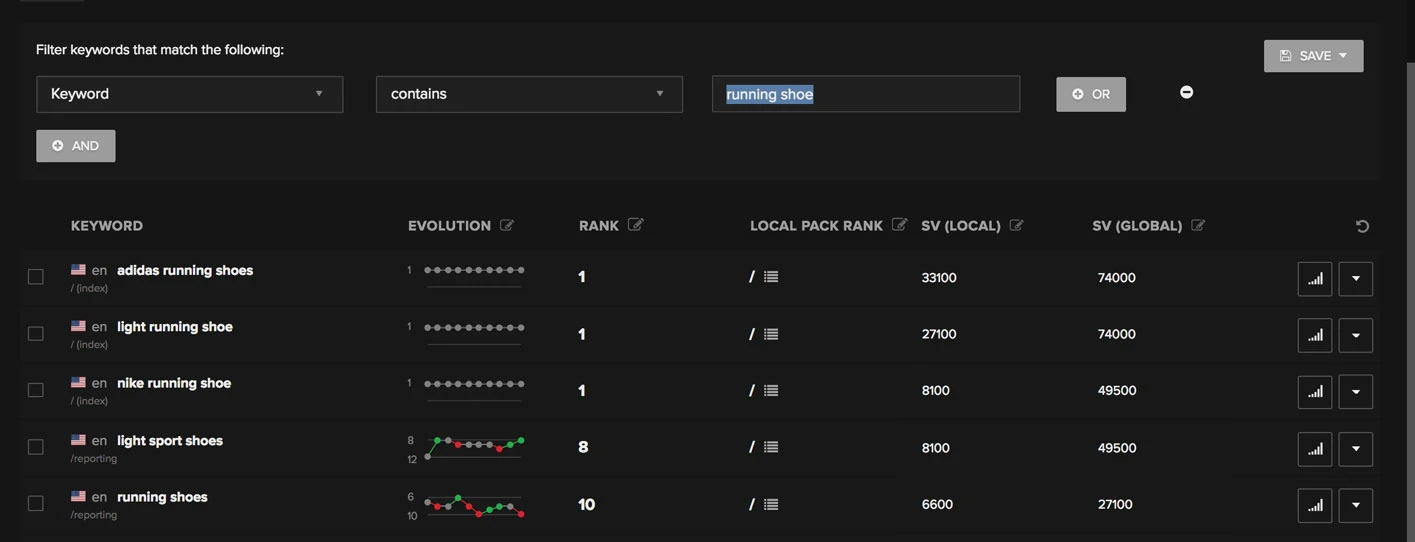
Then view both on the same graph. When you see a new backlink in the segment followed by a ranking improvement 2–3 weeks later, you’ve established a causal link between that backlink type and ranking for those keywords.
Measuring Blogging Outreach Effects
If you’re running a blogger outreach campaign, backlink monitoring gives you a direct feedback loop:
- Track which outreach placements go live (new backlink detected)
- Measure average rank for your target keyword segment before and after
- Attribute ranking improvements to specific link acquisitions
This makes your link building ROI measurable — something most teams fail to do because they lack the integrated monitoring setup.
Measuring Backlink Stream Health
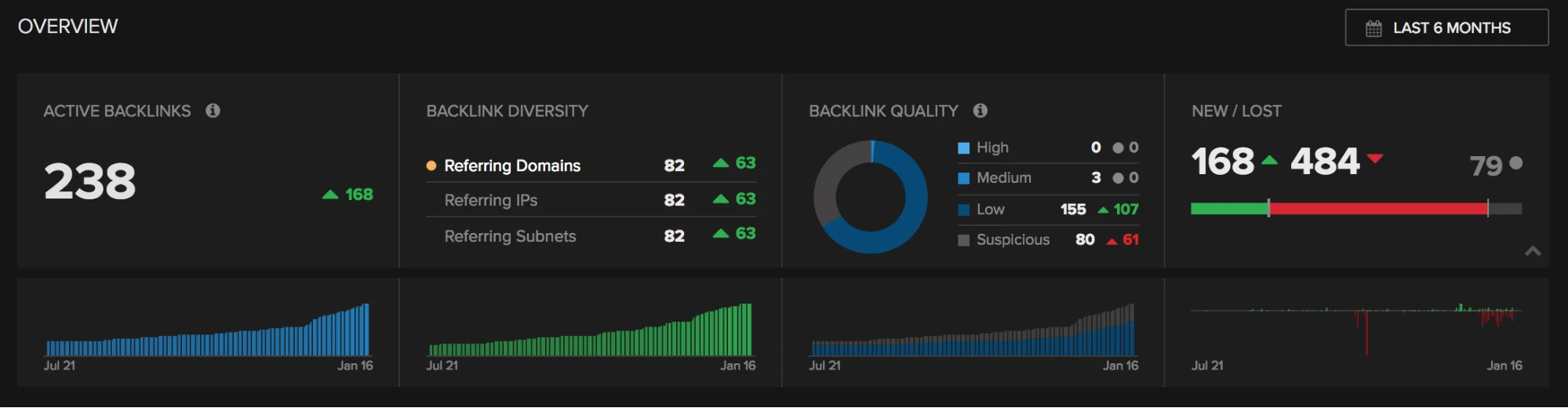
A healthy link building campaign produces a steady, even stream of new referring domains — not a spike-and-flatline pattern that signals manipulation. Monitor your referring domain acquisition rate over time:
- Healthy: gradual, consistent growth in referring domains month over month
- Suspicious: 200 new links in one week, then nothing for two months
- Red flag: sudden appearance of hundreds of links from the same subnet of IPs
Use Nightwatch’s backlink diversity section to track total backlinks, referring domains, and referring IPs as separate metrics. All three should grow together for a natural, healthy profile.
Connecting to Link Building Strategy
Once you can measure which backlinks correlate with ranking improvements, you can focus your link building efforts on the types of links that have demonstrated impact in your niche — rather than chasing raw link counts.
FAQ
What is backlink monitoring?
Backlink monitoring is the continuous process of tracking all inbound links to your website — detecting new links as they appear, identifying lost links when they’re removed, flagging toxic or spammy links, and monitoring changes to link attributes like nofollow/dofollow status. It’s an essential component of any ongoing SEO strategy.
How often should I monitor my backlinks?
For most sites, weekly reviews are sufficient combined with real-time alerts for high-priority events (DR 60+ links gained or lost). During active link building campaigns or if you suspect a negative SEO attack, daily monitoring is warranted. Nightwatch recrawls known backlinks regularly so the data stays current without manual checks.
Can bad backlinks actually hurt my rankings?
Yes — though it’s more nuanced than it used to be. A handful of low-quality links generally won’t trigger a penalty on their own; Google is good at ignoring junk. But a large-scale pattern of manipulative links (hundreds of exact-match anchors from link farms) can trigger algorithmic demotion or a manual action. The risk is highest if you or a past SEO provider actively built these links. For organically acquired spam, disavowing is still prudent if the volume is significant.
What’s the difference between backlink monitoring and a backlink audit?
A backlink audit is a one-time, point-in-time analysis of your entire link profile — typically done when diagnosing a penalty or before an SEO engagement. Backlink monitoring is continuous and ongoing. You need both: an audit to establish a baseline, and monitoring to track changes from that baseline forward.
How do I use competitor backlink monitoring to find link opportunities?
Add your top 3–5 competitors as tracked URLs in Nightwatch and review their backlink profiles. Filter for their highest-DR links and identify the linking domains. For each domain linking to a competitor but not to you, research what kind of content earned the link (guest post, resource inclusion, editorial mention) and build a targeted outreach plan to get a link from the same source. This process — sometimes called a “link gap analysis” — is one of the highest-ROI activities in link building. See our full guide on finding competitor backlinks for a step-by-step walkthrough.