SERP Monitoring: How to Track Rankings, Changes, and Opportunities
Search rankings are not static. A page that ranked #2 last Tuesday may be sitting at #9 today — and if you are not actively watching, you will not know until the traffic drop shows up in your analytics two weeks later. SERP monitoring closes that gap. It gives you a real-time view of where your pages rank, how the search results around your keywords are changing, and what your competitors are doing that you are not.
This guide covers what SERP monitoring is, what specifically to track, how to configure it properly in Nightwatch, and — critically — how to react when something changes.
Quick Takeaways
- SERP monitoring is the practice of continuously tracking your keyword rankings, SERP feature appearances, and competitor positions — not just checking them occasionally.
- Rankings fluctuate daily due to algorithm updates, competitor content changes, and user behavior signals; monitoring catches these shifts early.
- Beyond rank position, you should monitor featured snippets, People Also Ask boxes, local packs, and other SERP features that can steal clicks even when you rank high.
- Nightwatch supports keyword-level alerts, competitor tracking, and multi-location monitoring — making it suitable for both in-house SEO teams and agencies managing multiple clients.
- When a ranking drop occurs, the diagnostic process matters: algorithm update, content gap, technical issue, and manual penalty all require different responses.
- Automated alerts let you respond to significant changes within hours rather than discovering them after they have already impacted revenue.
Table of Contents
- What Is SERP Monitoring?
- Why Rankings Fluctuate Daily
- What to Monitor: Beyond Position Numbers
- SERP Monitoring vs. Rank Tracking: Key Differences
- How to Set Up SERP Monitoring in Nightwatch
- Setting Up Automated Alerts
- SERP Monitoring for Agencies
- How to Respond to Ranking Drops
- Turning SERP Data into Opportunities
What Is SERP Monitoring?
SERP monitoring is the ongoing practice of tracking how your website — and your competitors’ websites — appear in search engine results pages over time. It goes beyond a weekly rank check. Effective SERP monitoring means:
- Knowing your exact position for each keyword at any given time
- Detecting when you appear in (or drop out of) SERP features like featured snippets, image carousels, and local packs
- Watching competitor movements on your most valuable keywords
- Identifying unusual volatility that may signal a broad algorithm update
The distinction from simple rank tracking is intent. Rank tracking records a number. SERP monitoring builds a picture of the entire search results environment — who appears, in what format, and how that is changing.
For businesses that depend on organic search for revenue, SERP monitoring is not optional. It is the early warning system that separates proactive SEO from reactive firefighting.
Why Rankings Fluctuate Daily
Google makes thousands of algorithm changes per year — roughly 4,500 changes in 2023 alone, according to Google’s own transparency report. Most of these are small, but even minor adjustments ripple through rankings. Here is what drives day-to-day fluctuation:
Algorithm updates. Core updates happen several times a year and can dramatically reshuffle rankings across entire industries. Smaller, more targeted updates — targeting spam, helpful content signals, or link quality — happen continuously.
Competitor content changes. When a competitor publishes a more comprehensive piece on a keyword you both target, or earns a significant backlink, your relative position can shift within days. You had nothing to do with the change; the SERP simply recalibrated around new signals.
User behavior signals. Google monitors how users interact with search results — click-through rates, dwell time, pogo-sticking back to results. If searchers consistently skip your listing or return quickly, rankings can drift down over time.
Freshness signals. For news-adjacent topics and trending keywords, freshness is a ranking factor. Older content can be temporarily displaced by fresher articles, then recover once the spike subsides.
Crawl and indexing delays. When you make changes to a page — update the content, add internal links, fix a canonical — there is a delay before Googlebot recrawls and reprocesses the page. Rankings can dip temporarily during this window.
The only way to distinguish a temporary fluctuation from a real, sustained drop is to monitor continuously. A single weekly check misses the context of whether a drop started three days ago or two weeks ago, and what happened in the market at the same time.
What to Monitor: Beyond Position Numbers
Most rank checkers show you a position number. SERP monitoring is broader. Here is what you should be watching:
Position Changes
The baseline: where your pages rank for each target keyword, measured consistently. Pay particular attention to:
- Top 3 to Page 2 drops — traffic impact is severe when a page drops out of the top 3 positions.
- Page 2 to Page 1 movement — pages on the edge of Page 1 are highest-leverage candidates for content improvement.
- New keywords entering the top 10 — pages ranking unexpectedly for keywords you did not target are content expansion opportunities.
SERP Feature Appearances and Losses
Organic position is only part of the story. SERP features occupy significant real estate above and around traditional blue links:
Featured snippets. Appearing in the featured snippet (position zero) can drive substantial clicks even from a #4–5 rank. Losing a snippet to a competitor can cut CTR in half even if your underlying rank does not change.
People Also Ask (PAA). PAA boxes expand dynamically and capture informational intent. Monitoring which PAA questions you appear in — and which new questions surface — reveals content opportunities.
Local pack. For location-based keywords, the local pack (map + three listings) dominates the page. If your business appears in the local pack, you need to monitor that separately from traditional organic ranks.
Image and video carousels. Visual SERP features are increasingly common for product, recipe, and how-to content. Appearance in these carousels affects click distribution significantly.
Knowledge panels and rich results. Structured data markup drives rich results — star ratings, FAQs, product prices. Tracking whether your rich results appear correctly is part of complete SERP monitoring.
Competitor Movements
Watching your own rankings in isolation misses half the picture. When a competitor moves from #6 to #2, that affects you — even if your own position is unchanged. Track:
- Direct competitors on your top 20 keywords
- New domains entering the top 10 for core keywords (indicates Google has found a new, authoritative source)
- Competitor SERP feature gains and losses
Volatility Spikes
SERP volatility — the degree to which all results for a given keyword are shuffling simultaneously — is a signal of either an algorithm update or significant market change. High volatility across many keywords at once typically precedes a broad core update announcement. Detecting this early helps you contextualize what is happening before making reactive content changes.
For a deeper look at tracking volatility signals, see our guide to SERP volatility tracking.
SERP Monitoring vs. Rank Tracking: Key Differences
These terms are often used interchangeably, but they describe different scopes of work:
| Rank Tracking | SERP Monitoring | |
|---|---|---|
| Focus | Your keyword positions | Full SERP environment |
| Frequency | Often daily or weekly snapshots | Continuous, with alert thresholds |
| Competitor data | Sometimes included | Core component |
| SERP features | Rarely included | Essential |
| Response model | Manual review | Alerts triggering action |
| Use case | Reporting position history | Detecting and reacting to changes |
Rank tracking is a subset of SERP monitoring. If you are doing rank tracking without monitoring the surrounding SERP environment — competitor activity, feature changes, volatility — you are working with incomplete information.
The practical difference shows up when a page drops from #2 to #5. Rank tracking tells you the position changed. SERP monitoring tells you that a new competitor entered the top 3, captured the featured snippet, and added a video carousel — giving you a specific, actionable explanation.
How to Set Up SERP Monitoring in Nightwatch
Nightwatch provides daily keyword tracking, SERP snapshots, competitor monitoring, and configurable alerts. Here is how to set it up effectively.
Step 1: Add Your Website
After logging into Nightwatch, add your website URL under the URLs section. Set the correct protocol (https) and ensure the domain is verified. This connects your keyword data to your site’s pages.
Step 2: Add Keywords
Navigate to Keywords and add your target keywords. For each keyword, configure:
- Search engine and country — Nightwatch tracks rankings per search engine and location. Add separate keyword instances for each market you care about.
- Keyword tags — use tags to group keywords by topic cluster, page, or business priority. This makes filtering and reporting significantly easier.
- Device type — mobile and desktop rankings diverge substantially. If your audience is primarily mobile, track both and pay close attention to mobile-specific patterns.
For competitive markets, prioritize keywords where you are currently ranking between positions 4 and 20. These are the highest-leverage targets — close enough to Page 1 (or the top 3) that a targeted improvement will move the needle, but not so established that a competitor can easily unseat you overnight.
Step 3: Configure Update Frequency
Nightwatch updates keyword rankings daily by default. For your most business-critical keywords, daily tracking gives you the temporal resolution to catch drops quickly and correlate them with specific events (a site change you made, a competitor’s new article, a known algorithm update date).
Step 4: Add Competitors
Under Competitors, add the domains of your top 3–5 competitors. Nightwatch will track their positions alongside yours for every keyword you are monitoring. You will see when a competitor moves up on your keywords — before that movement translates into a traffic shift on your side.
Step 5: Enable SERP Snapshots
Nightwatch captures historical SERP snapshots, allowing you to compare how results looked on any two dates. This is particularly useful after algorithm updates — you can look at the SERP from the day before and the day after the update to see exactly what changed and for whom.
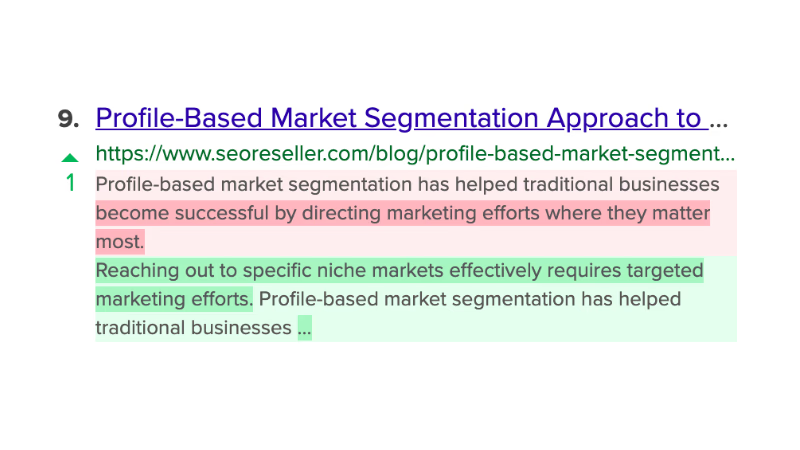
The SERP Preview shows:
- Position change indicators (up/down arrows with magnitude)
- Title and meta description changes highlighted by word — removed text in red, added text in green
- Your domain highlighted for quick identification
This level of detail makes it possible to detect when a competitor rewrote their title tag before you notice the CTR impact on your own pages.
Step 6: Set Up Views and Segments
Nightwatch’s Views feature lets you create filtered segments of your keyword set. Create views for:
- Brand vs. non-brand — brand keyword rankings behave differently and should be analyzed separately
- By page or content cluster — if you want to monitor performance of a specific section of the site
- By keyword intent — informational, commercial, transactional keywords respond differently to algorithm changes
For a complete breakdown of reporting best practices, see our guide to SEO performance reporting.
Setting Up Automated Alerts
Manual review of rankings is time-consuming and inconsistent. Automated alerts ensure that significant changes are flagged immediately, regardless of whether anyone remembers to log in and check.
In Nightwatch, configure alerts for:
Significant position drops. Set a threshold — for example, any keyword dropping 5 or more positions in a single day — to trigger an email or Slack notification. For high-value keywords (top 3 positions, high commercial intent), use a tighter threshold of 3 positions.
Ranked/not-ranked transitions. When a keyword drops entirely out of the top 100, or when a new keyword enters the top 10, these are high-signal events that warrant immediate review.
Competitor position changes. Alert when a competitor breaks into the top 3 on a keyword where you currently hold a top 5 position. This is the early warning before the traffic impact reaches your side.
SERP feature gains and losses. If your page captures or loses a featured snippet, that can have a larger CTR impact than a 2-position rank change. Treat these as critical alerts.
The goal of alert configuration is to be notified about things that require a decision — not to receive a notification for every minor fluctuation. Calibrate thresholds so that alerts represent actionable signals, not noise.
SERP Monitoring for Agencies
Agencies face a different challenge than in-house SEO teams: they need SERP monitoring across dozens or hundreds of client accounts, with reporting that is client-appropriate rather than raw data.
Multi-Client Tracking at Scale
Nightwatch supports separate URL/project workspaces, making it possible to manage distinct monitoring configurations for each client. Each client’s keywords, competitors, and alert thresholds are independent.
For agencies scaling SERP monitoring, the key operational decisions are:
Keyword prioritization per client. Not every client has the budget to track 500 keywords daily. Work with clients to identify the 20–50 keywords with the highest revenue correlation, and monitor those at daily frequency. Long-tail keywords can be checked weekly.
Standardized alert thresholds. Create a standard alert template for all clients (e.g., drop 5+ positions, enter/exit top 10, featured snippet change) so that you respond consistently rather than treating each account ad hoc.
Automated competitor tracking. For each client, identify the 3 most direct organic competitors and add them to Nightwatch. When a client asks “why did our traffic drop?”, competitor movement data often provides the answer faster than any other source.
For more on building scalable agency SEO workflows, see our guide on scaling SEO for agencies.
Client-Facing Dashboards
Raw rank data is not what clients want to see. They want to understand whether their SEO investment is working. Nightwatch’s reporting features allow you to build filtered views that show:
- Keyword position trends over the reporting period
- Share of keywords in top 3, top 10, top 20
- Competitor position comparison
- Notable events (significant drops, new top-10 entries, featured snippet gains)
White-label reporting options allow agencies to present this data under their own branding. For a detailed walkthrough of building client dashboards, see our guide to SEO client dashboards.
Clients do not need to see daily volatility. They need to see the trend — and understand what you are doing about it. Structure your reporting cadence around that goal: daily monitoring for internal use, monthly client reports with narrative context.
How to Respond to Ranking Drops
Detection is only half the job. When SERP monitoring surfaces a ranking drop, the response needs to be diagnostic before it is reactive. Different causes require different fixes, and making the wrong change can worsen the situation.
Step 1: Determine the Scope
Is the drop isolated to one keyword, one page, or does it affect the entire domain?
- Single keyword, single page — likely a content or on-page issue, or a competitor-specific change on that query.
- Multiple keywords, same page — the page may have a technical issue (indexability, canonical, structured data) or its overall authority has declined.
- Broad drop across many keywords — suggests a domain-level issue: algorithm update impact, a significant backlink loss, or a technical change affecting the whole site (redirect misconfiguration, robots.txt change, site speed regression).
For a detailed diagnostic framework, see our guide on diagnosing ranking drops.
Step 2: Check the Timeline
When exactly did the drop start? Cross-reference the date with:
- Known algorithm update dates — Google Search Central and third-party trackers (Semrush Sensor, Mozcast) log confirmed update dates. If your drop started within a day or two of a confirmed core update, the cause is likely algorithmic, and the response is content quality improvement rather than technical fixes.
- Your own site changes — did you deploy a new template, update content, add or remove pages, or make server configuration changes around that time?
- Competitor changes — did a competitor publish new content, earn significant press coverage, or make major site improvements?
Step 3: Diagnose the Cause
Algorithm update. If the drop correlates with a confirmed update, review Google’s guidance on what the update targeted. Core updates generally reward content that demonstrates expertise, experience, authoritativeness, and trustworthiness (E-E-A-T). The response is content improvement, not technical tweaking.
Competitor content improvement. If a competitor now outranks you with a more comprehensive, better-structured, or fresher piece, a content gap analysis is the starting point. Review what they cover that you do not, and update your page accordingly.
Technical issue. Check Search Console for indexing errors, coverage issues, or manual actions. Use a crawl tool to verify that the page is accessible, the canonical tag is correct, and the page is not accidentally blocked by robots.txt or noindex directives.
Manual penalty. If Search Console shows a manual action, the response is to address the specific violation, submit a reconsideration request, and wait. Manual penalties have a defined resolution process; other causes do not.
Backlink loss. A significant referring domain pointing to your page may have been removed, redirected, or had its own authority decline. Check your backlink profile for recent losses on the affected pages.
Step 4: Respond and Monitor
After making a change, do not expect immediate recovery. Most ranking responses to content or technical changes take days to weeks, depending on how quickly Googlebot recrawls the page. Set up an alert to notify you when the keyword starts recovering, so you can correlate the change you made with the movement.
Avoid making multiple large changes simultaneously. If you rewrite the content, update the internal linking structure, and change the URL all at once, you cannot attribute the recovery (or further decline) to any specific action. Make one significant change at a time and measure.
Turning SERP Data into Opportunities
SERP monitoring is not only a defensive practice. The same data that detects problems also surfaces opportunities.
Content Gap Identification
When a competitor consistently outranks you on a cluster of related keywords, reviewing their content reveals what topics, questions, or depth of coverage Google is rewarding. This is a content roadmap built from live SERP evidence rather than hypothetical keyword research.
SERP Feature Targeting
If you are ranking in the top 5 for a keyword but do not have the featured snippet, and a competitor does, that snippet is achievable. Review how the competitor structured their content — often the snippet answer is a direct response to the search query in the first 100 words of the page, under a clear heading that mirrors the query.
Discovering Unintentional Rankings
Pages often rank in the top 20 for keywords you never specifically targeted. These are content expansion opportunities — the page already has some relevance signal, and a targeted optimization pass can push it into the top 10.
Competitor Vulnerability Windows
When a competitor drops significantly on a keyword — perhaps due to a site migration, a penalty, or simply neglect — that creates a window to move up. If you are monitoring competitor positions, you will see these windows open. Respond quickly with content or link building efforts on that keyword, and you can capture position gains that are otherwise hard to achieve.
For a detailed framework on using SERP analysis for competitive research, see our guide to SERP analysis.
Key Takeaways
SERP monitoring is the practice of watching the full search results environment — not just your own rankings, but competitor movements, SERP feature changes, and volatility patterns — on a continuous basis.
The value of monitoring comes from its speed. By the time a ranking drop shows up in your traffic data, you are already behind. SERP monitoring surfaces the signal within hours, giving you time to diagnose and respond before the business impact compounds.
For SEO teams and agencies that manage rankings at scale, the operational infrastructure matters as much as the data: structured keyword groupings, calibrated alert thresholds, competitive tracking on every important keyword, and client reporting that translates position changes into business context.
Nightwatch is built to support this workflow — daily tracking, historical SERP snapshots, competitor monitoring, and flexible reporting that scales from a single-site owner to an agency managing hundreds of clients. If you are not monitoring your SERPs today, every day you wait is a day you might be losing ground without knowing it.