
10 Best SEO Tools Every Marketer Should Use in 2026
Over here at Nightwatch, we create a lot of content. And as any content marketer knows, keeping up with SEO while managing content production can be overwhelming. There’s keyword research, rank tracking, AI content optimization, and on top of that, there’s always something new to learn, test, and improve.
That’s why we rely on a solid toolkit of the best SEO tools to keep everything running smoothly. These tools help us discover new opportunities, streamline our content creation process, and make decisions that boost visibility and performance.
And because SEO is hard enough already, we decided to share that toolkit with you.
This guide breaks down the top SEO tools we rely on, and why.
TL;DR: Which SEO Tool Should You Choose?
- For accurate daily rank tracking across Google and AI search (Nightwatch): Location-specific tracking (100k+ locations), multi-site support, white-labeled reporting, and competitor visualization
- For automating keyword research, technical SEO, and content workflows (NightOwl): AI SEO agent that uses real data (difficulty, volume, CPC), not just language models
- For free, first-party Google data (Google Search Console): Essential for performance monitoring and indexing
- For on-page SEO in WordPress (Yoast SEO): Helps you publish SEO-ready content right from your CMS
- For early trend discovery (Exploding Topics): Spots rising topics before they peak
- For long-tail question mining (AnswerThePublic): Great for FAQ and content ideation
- For AI-assisted drafting and ideation (ChatGPT): Versatile assistant for content work
- For Google-powered demand data (Google Keyword Planner): Reliable CPC and volume ranges built for advertisers
- For budget-friendly SEO on a small team (Keysearch): Accessible and affordable keyword research tool for beginners on a budget
- For AI-powered research and citations (Perplexity): Excellent for sourcing and content authority, though not a traditional SEO tool
How We Evaluated These SEO Tools
To choose the right SEO software for your tool stack, you need to find solutions that fit your workflow and deliver results you can trust. Here’s what we considered when evaluating options for our own SEO needs, and putting this guide together:
Accuracy and Data Freshness
For rank tracking and keyword research, accuracy matters more than volume. We prioritized tools that provide reliable, up-to-date data for features, such as keyword research, daily ranking updates, and location-specific tracking. Tools that rely on stale or estimated data can lead to poor decisions.
Workflow Fit
We also considered how each tool integrates into common SEO workflows. Would a particular tool gel well for you if you’re a solo freelancer, a small marketing team, or an agency managing dozens of clients?
Usability
Complex tools aren’t useful if they slow you down. We evaluated how intuitive each platform is, how quickly you can access key insights, and whether the learning curve is reasonable for its intended audience.
Feature Depth
We looked at whether each tool does its core job well. A rank tracker should excel at tracking; an AI agent should automate intelligently. Breadth of features matters less than depth in the areas that count.
Pricing Transparency
Pricing in SEO software varies wildly. We categorized tools by pricing range: Free, Entry-level, Mid-range, or Enterprise. This is to help you quickly identify what fits your budget. We intentionally avoided exact prices, as plans and pricing structures change frequently.
Limitations
Every tool has trade-offs. We explicitly call out shortcomings, such as limited backlink data, delayed reporting, or lack of competitor insights, so you can make informed decisions rather than discovering gaps after you’ve committed.
Nightwatch
Best for: SEO professionals, agencies, and teams who need accurate, daily rank tracking with granular location control and AI search visibility monitoring.
If you’ve ever juggled multiple SEO tools just to monitor rankings, track competitors, and report on performance, you’ll know how exhausting it can get. Nightwatch started as a traditional SEO rank tracker built to solve exactly that problem, and has since evolved into a more advanced platform that supports both classic SEO monitoring and modern AI search tracking.
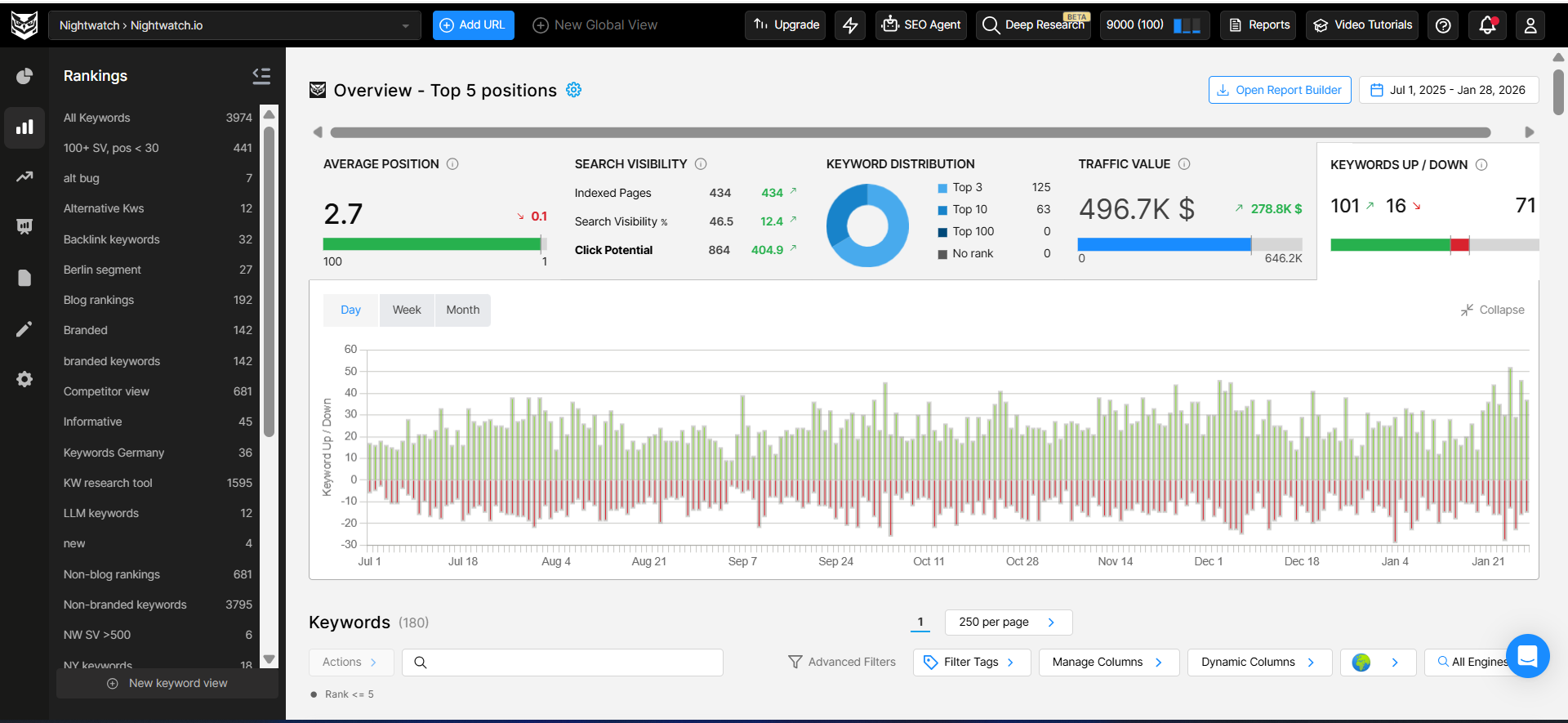
Essentially, Nightwatch helps you monitor how your website ranks for the keywords that matter most to your business. You simply add your target keywords, and Nightwatch tracks their positions across Google, Bing, YouTube, and more. You can see where each keyword ranks today, how those rankings change over time, and how your visibility evolves across different devices and locations.
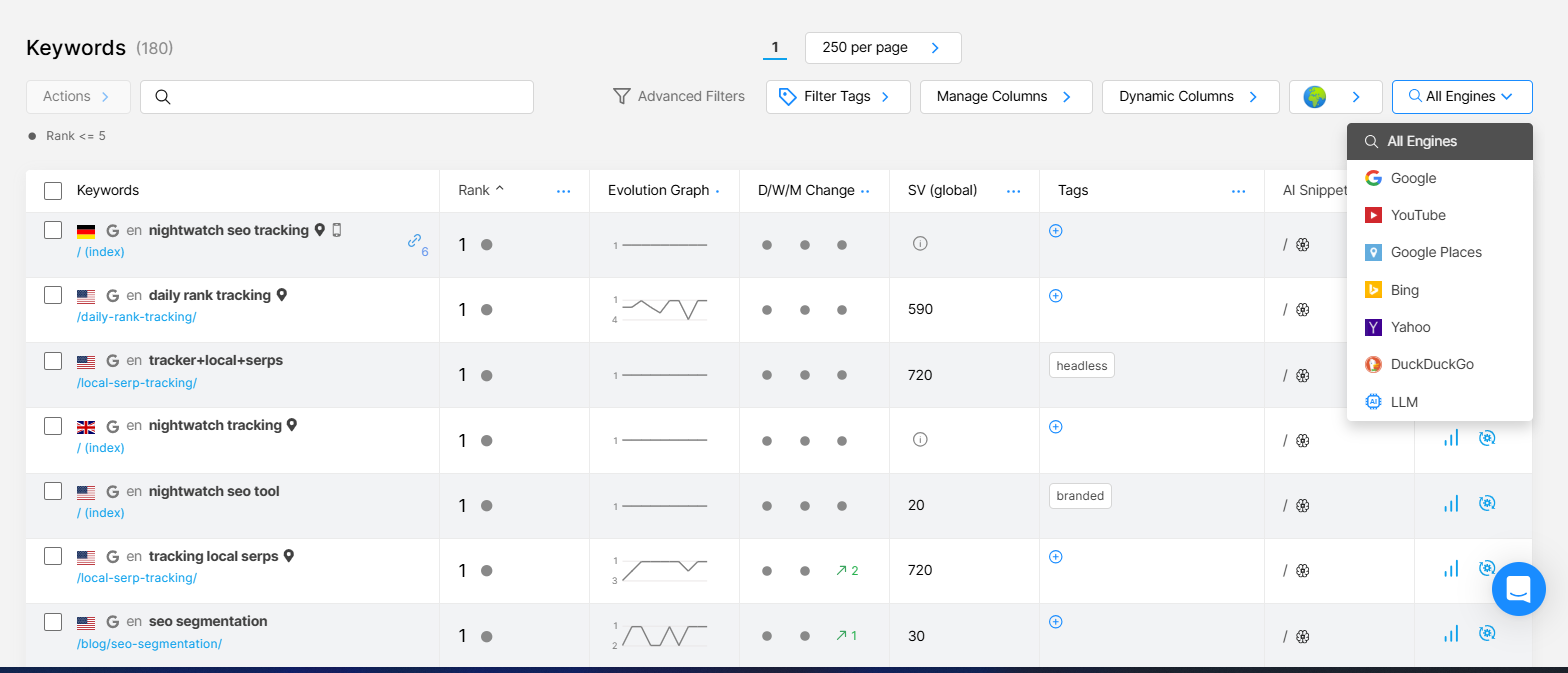
To make this data easier to interpret, Nightwatch pairs rank tracking with clear visualizations. Interactive graphs and trend lines help you quickly spot improvements, drops, and long-term performance patterns. This way you can actually see and understand what’s happening in search.
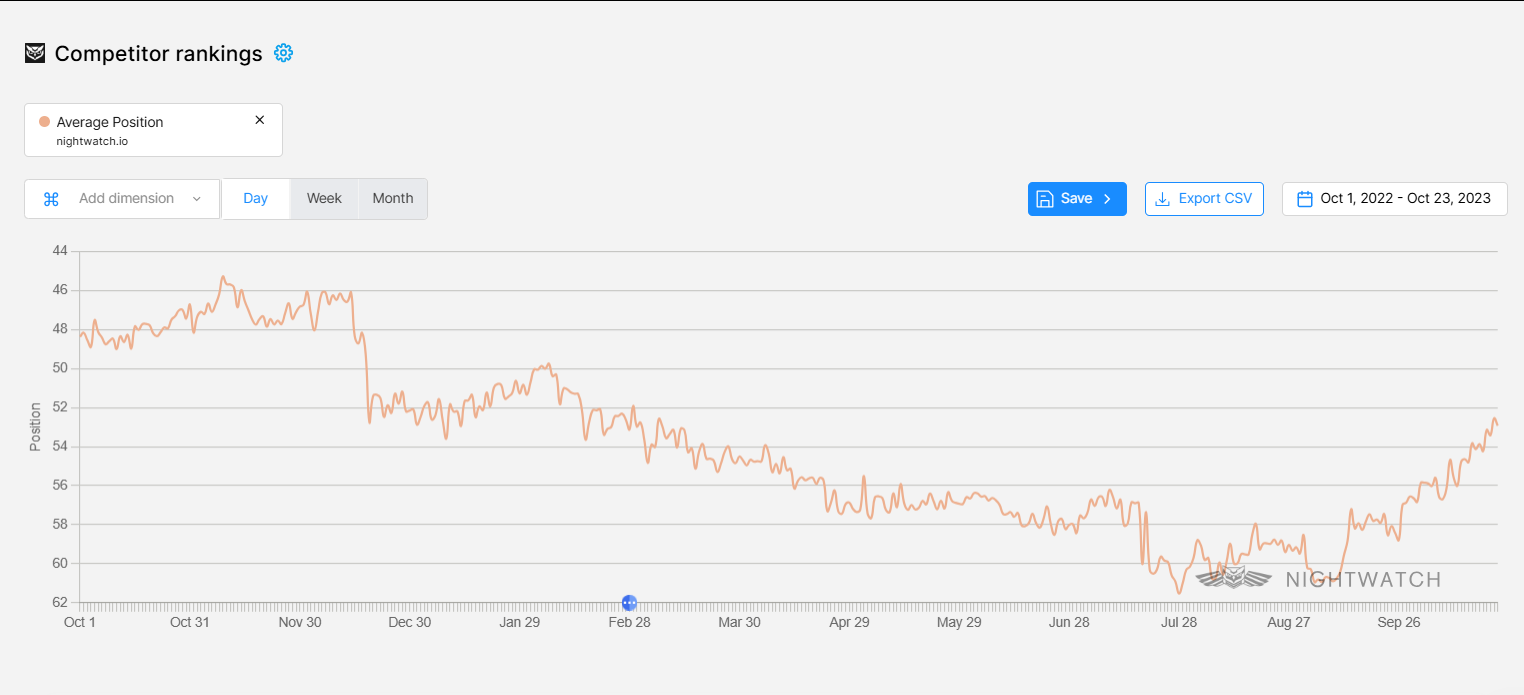
Nightwatch also includes competitive analysis features that let you add competitors directly to your dashboard. This allows you to compare keyword rankings side by side, track how competitors are performing for the same search terms, and identify opportunities where you can close gaps or pull ahead.
For teams and agencies, reporting is built directly into the platform. Nightwatch offers customizable, white-label reports that make it easy to share ranking performance with stakeholders or clients without manual data exports or spreadsheets.
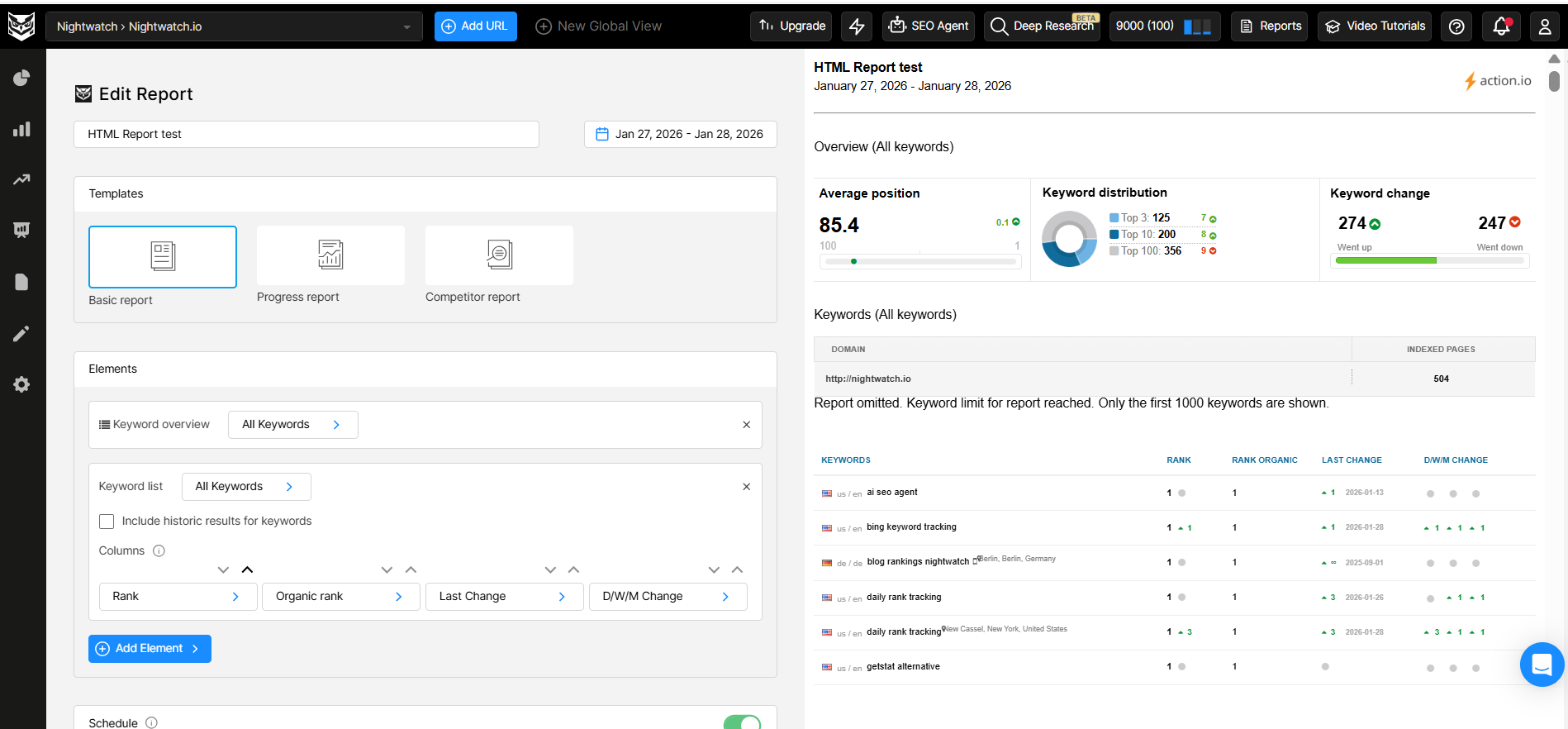
As search continues to evolve, Nightwatch has expanded beyond traditional rank tracking. With the rise of AI-powered search experiences, the platform now includes AI tracking alongside classic SEO monitoring. From the same dashboard where you track keyword rankings, you can also monitor how your content appears in AI Overviews and AI-generated search results.
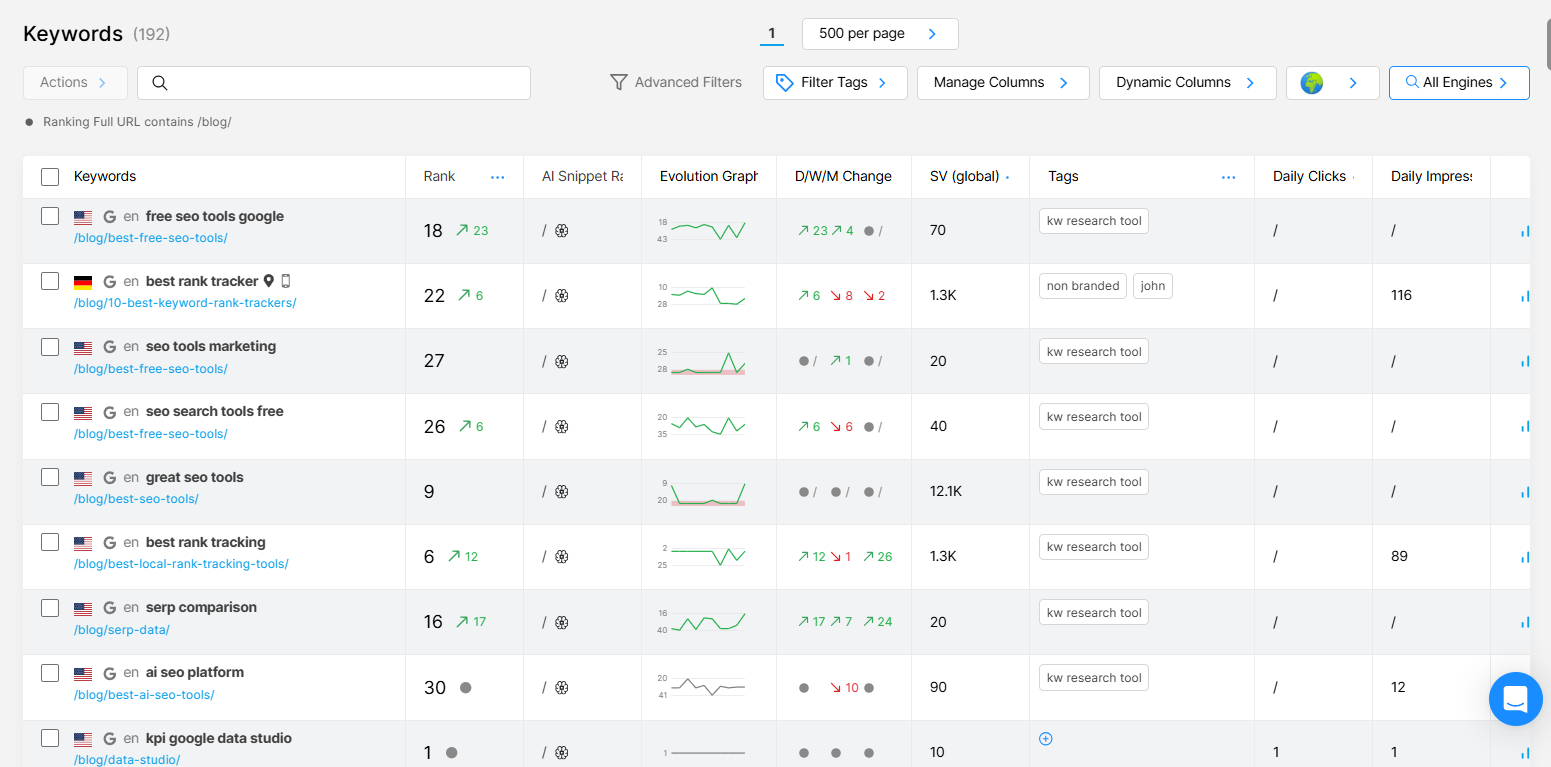
This means you can view traditional keyword rankings and AI visibility side by side, without conflict or confusion. You can still track rankings across more than 100,000 locations worldwide, across mobile and desktop, while also understanding how AI search engines interpret and surface your content.
This makes Nightwatch a single platform for tracking how your site performs in both traditional SERPs and modern AI-driven search.
Primary Use Cases
- Daily rank tracking across Google, Bing, and AI search engines: Monitor positions with daily updates, not weekly estimates. Track how your content appears in traditional SERPs and AI-generated results.
- Location-specific tracking at scale: Track rankings from 100,000+ locations worldwide. Essential for local SEO, multi-location businesses, and international campaigns where rankings vary significantly by geography.
- Multi-site management: Manage up to 50 websites from a single dashboard, making it practical for agencies and in-house teams handling multiple properties.
- White-labeled reporting: Generate client-ready reports with your branding. Schedule automated delivery and customize which metrics to include.
- Competitor visualization: See your rankings alongside competitors on the same graph. Identify when competitors gain or lose ground and respond quickly.
- Site audits: Run technical SEO audits to detect crawl errors, broken links, duplicate content, and page speed issues.
For a detailed walkthrough of the rank tracking interface and how to set up location-specific tracking, see our guide on creating meaningful local SEO reporting.
Shortcomings
- Backlink monitoring exists but is not a core strength: If deep backlink analysis is your primary need, you’ll likely want a specialized tool alongside Nightwatch.
- Learning curve for beginners: The platform’s depth means new users may need time to explore all features.
Pricing Range: Entry-level to Mid-range (plans scale based on tracked keywords and features)
NightOwl
Best for: Marketers and content teams who want to speed up SEO execution without handing strategy over to automation.
NightOwl is Nightwatch’s SEO assistant designed to help teams get through everyday SEO tasks faster. In the past, your typical SEO workflow would involve jumping between multiple tools for keyword research, SERP analysis, content optimization, and audits. But now, you can handle much of this work directly inside NightOwl using simple prompts.
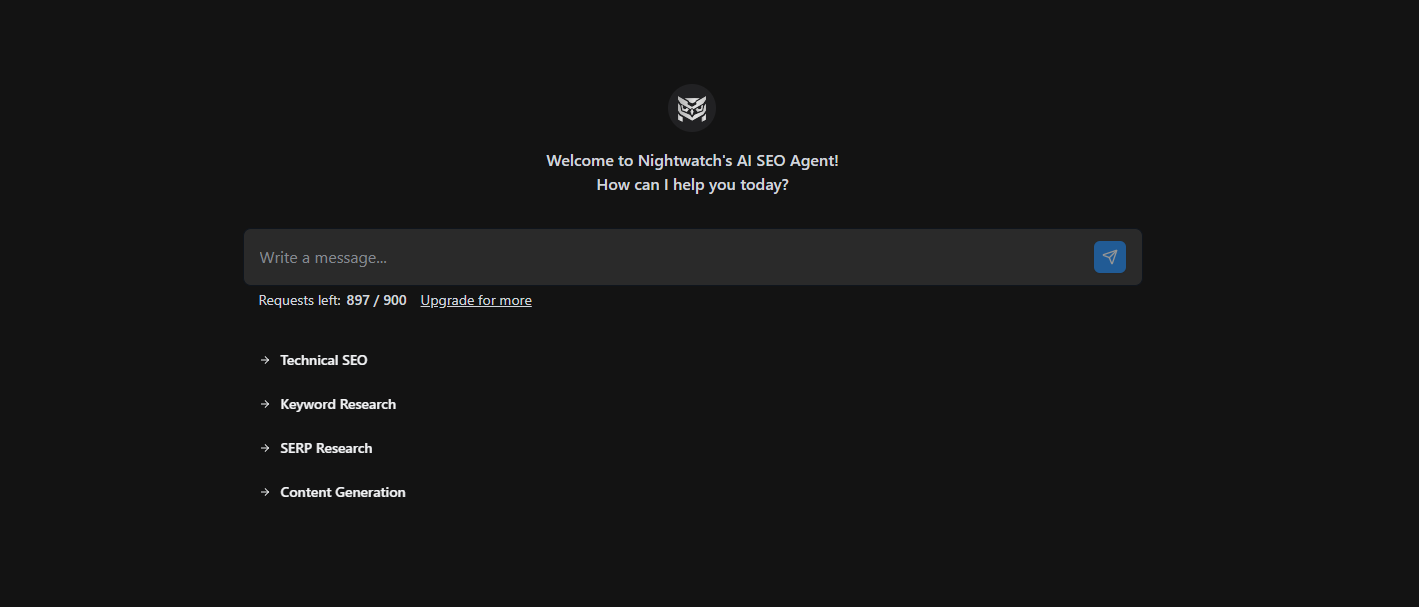
NightOwl supports tasks like keyword research, content analysis, and technical checks. You give it a clear instruction, and it responds with suggestions based on your site’s data. But do keep in mind that it works best with teams who simply want to remove the manual steps that usually slow SEO work down. It doesn’t replace your decision-making or unique insights, and it can make mistakes, just like any AI platform.
But what sets NightOwl apart from generic AI tools is that it works with live SEO data. While you’re using it, NightOwl can pull in real keyword difficulty scores, search volume, CPC data, and SERP insights from Nightwatch’s and Google’s data sources. This keeps its recommendations grounded in what’s actually happening in search right now.
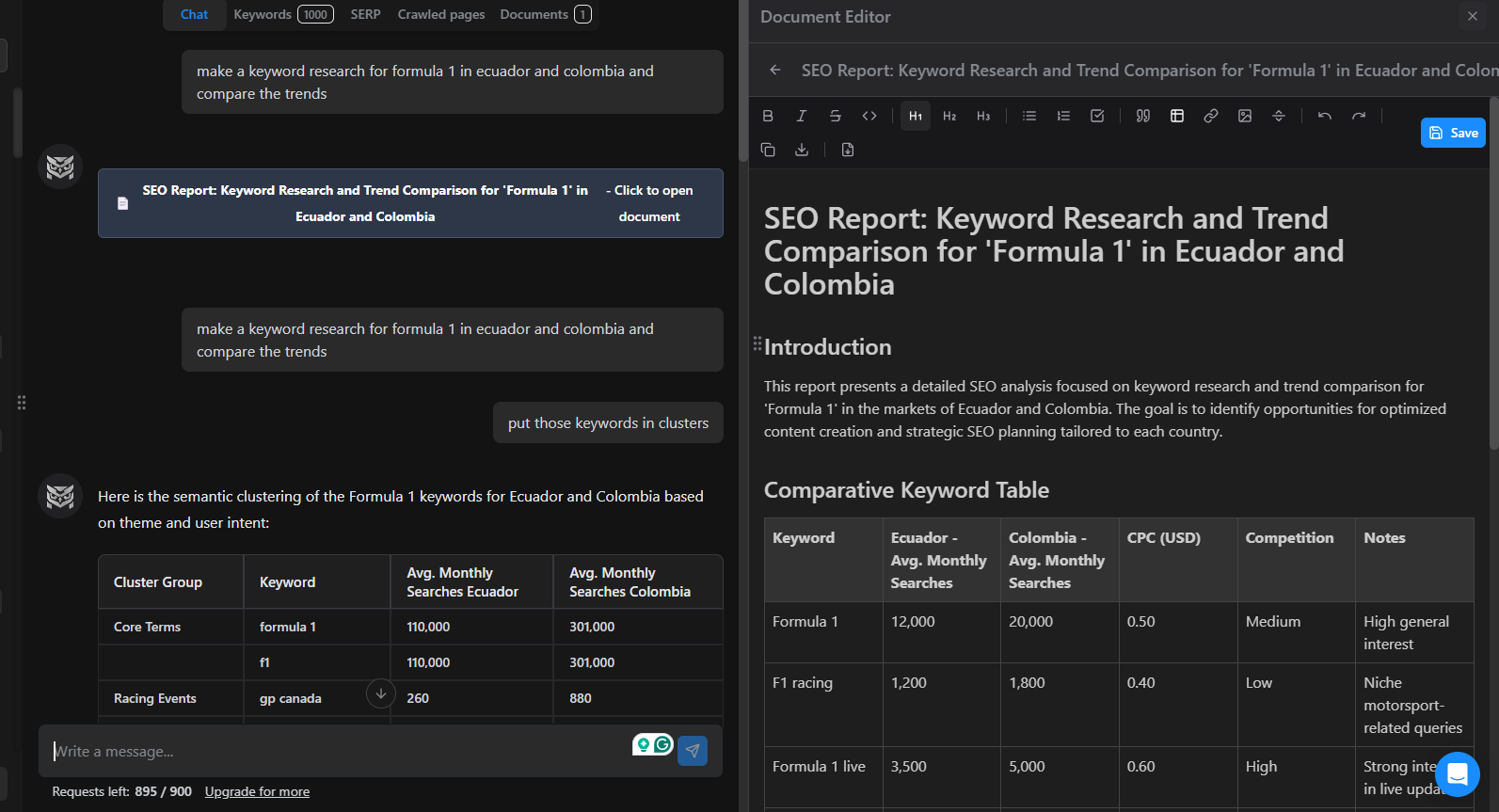
Keyword research, without the usual back-and-forth
Instead of manually researching keywords across multiple tools, you can prompt NightOwl directly.
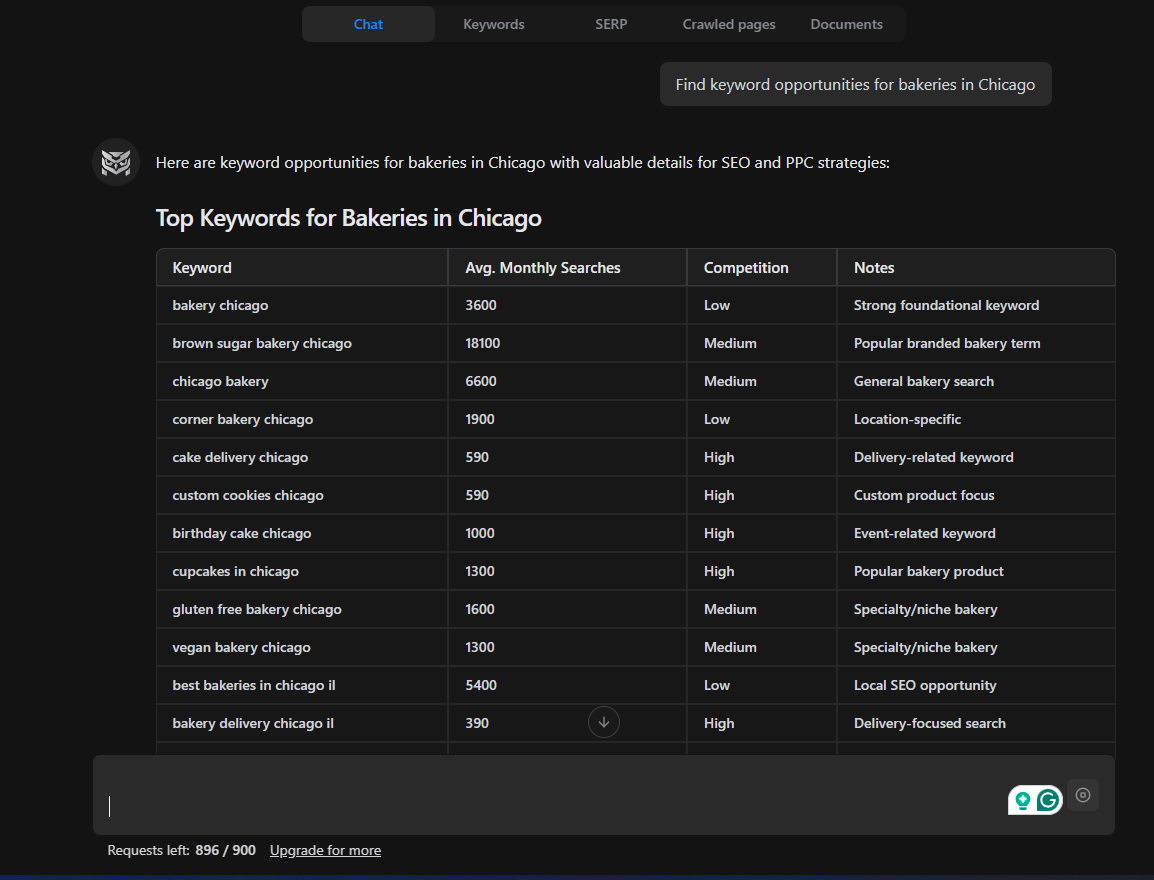
For example, you might ask:
Find keyword opportunities for bakeries in Chicago.
NightOwl will return relevant keyword suggestions along with search volume, difficulty, and SERP context. This makes it easier to decide which terms are worth targeting and which ones to skip.
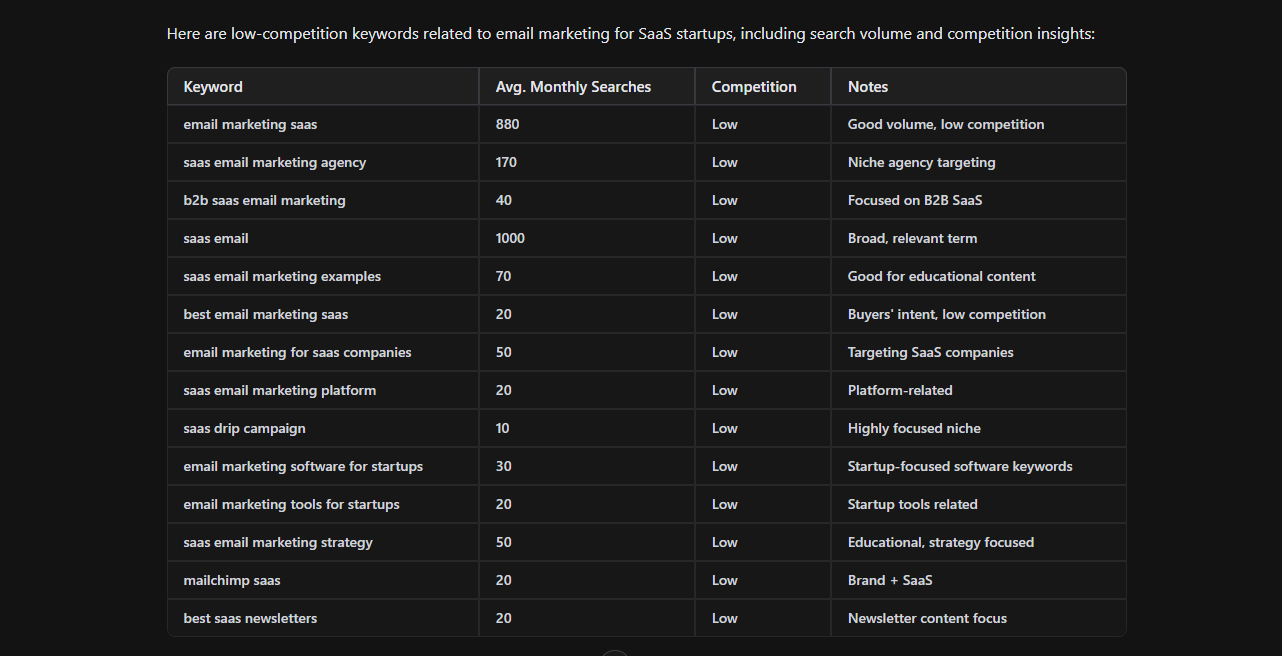
You can also refine your prompts:
Show me low-competition keywords related to email marketing for SaaS startups.
This helps you quickly narrow in on keywords that align with your niche and ranking potential.
Content improvement and gap analysis
NightOwl can also help you optimize already published content. You can ask it to review an existing page and suggest improvements based on what’s ranking for that topic.
For example:
Analyze this article and suggest ways to improve its chances of ranking on page one.
The agent can highlight missing subtopics, suggest additional keywords to include, or recommend structural changes based on competing pages. This makes it easier to update content strategically, rather than guessing what might help.
Supporting technical SEO tasks
Beyond content, NightOwl can assist with technical SEO by pointing out potential issues that could affect performance.
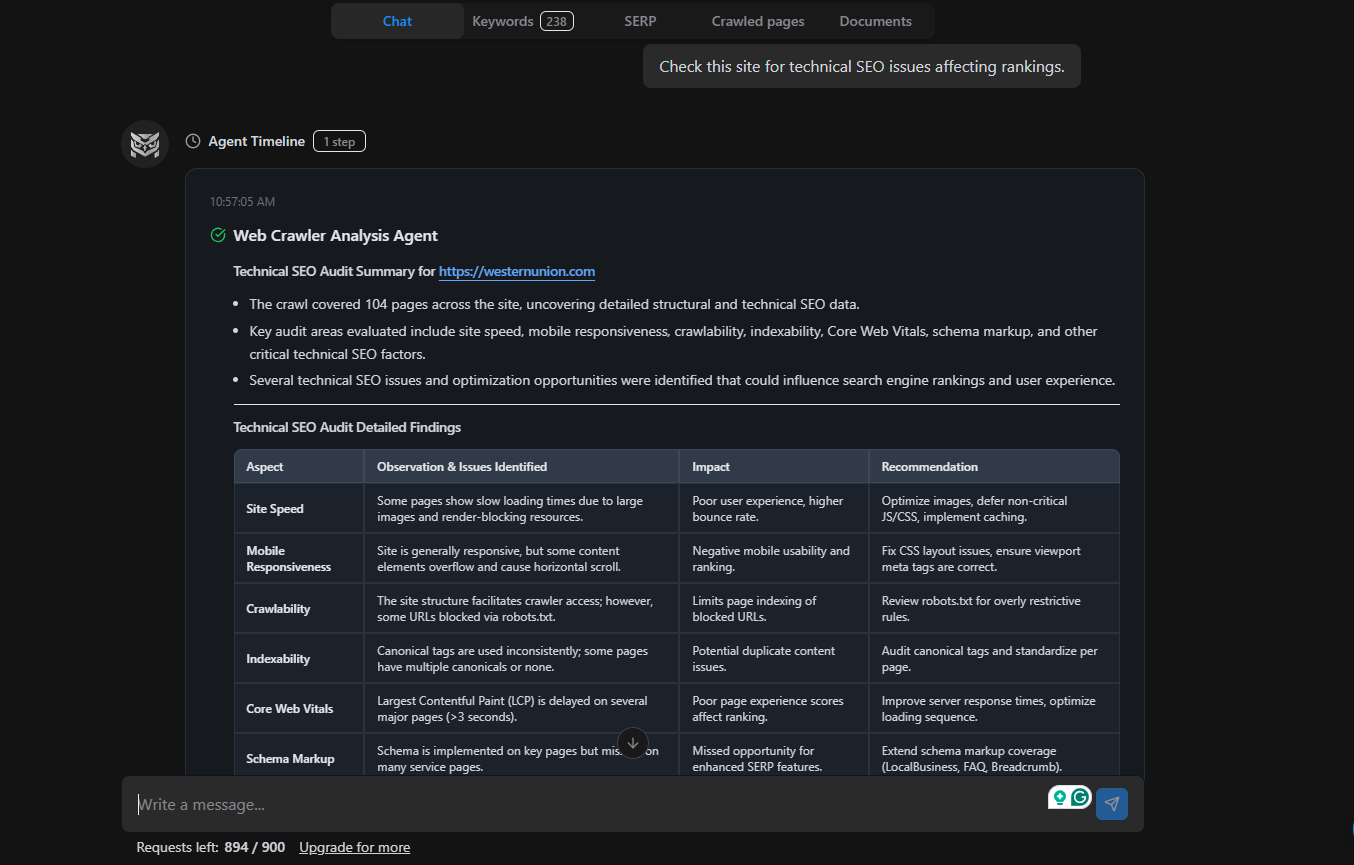
A prompt like:
“Check this site for technical SEO issues affecting rankings.”
can surface areas that need attention, without requiring you to run multiple audits or sift through complex reports.
A practical SEO assistant, not a replacement
In practice, NightOwl works best as a support tool. It handles the heavy lifting, like data gathering, comparisons, and suggestions, while you stay in control of strategy and final decisions.
When combined with Nightwatch’s rank tracking and reporting features, NightOwl helps teams move from insight to action faster. You can track performance, understand what’s changing in search, and respond quickly, all from a single platform.
Primary Use Cases
- Automated keyword research with real metrics: Generate keyword lists with search volume, competition level, and CPC data. NightOwl clusters keywords by intent and semantic similarity.
- Technical SEO automation: Run audits that detect missing H1 tags, broken links, duplicate content, slow pages, and schema markup errors. Receive prioritized recommendations with developer-ready fixes.
- Content optimization at scale: Generate content briefs with target keywords, suggested headings, People Also Ask queries, and internal linking opportunities. Identify content gaps compared to top-ranking competitors.
- Keyword clustering: Group related keywords into logical clusters for pillar content strategies and topical authority building.
Example workflow: Prompt NightOwl with “Conduct keyword research for email marketing automation” and receive clustered keywords grouped by intent (informational, transactional, navigational), complete with volume and difficulty data. Then ask it to generate a content brief or identify content gaps against competitors.
For detailed prompt examples and workflow guides, see our article on AI keyword research.
Shortcomings
- Not a content writer: NightOwl excels at research, audits, and recommendations, but final content creation still requires human input.
- Requires clear prompting: Like any AI agent, output quality depends on prompt specificity. Vague requests produce vague results.
Pricing Range: Included with Nightwatch subscriptions (Entry-level to Mid-range)
Google Search Console
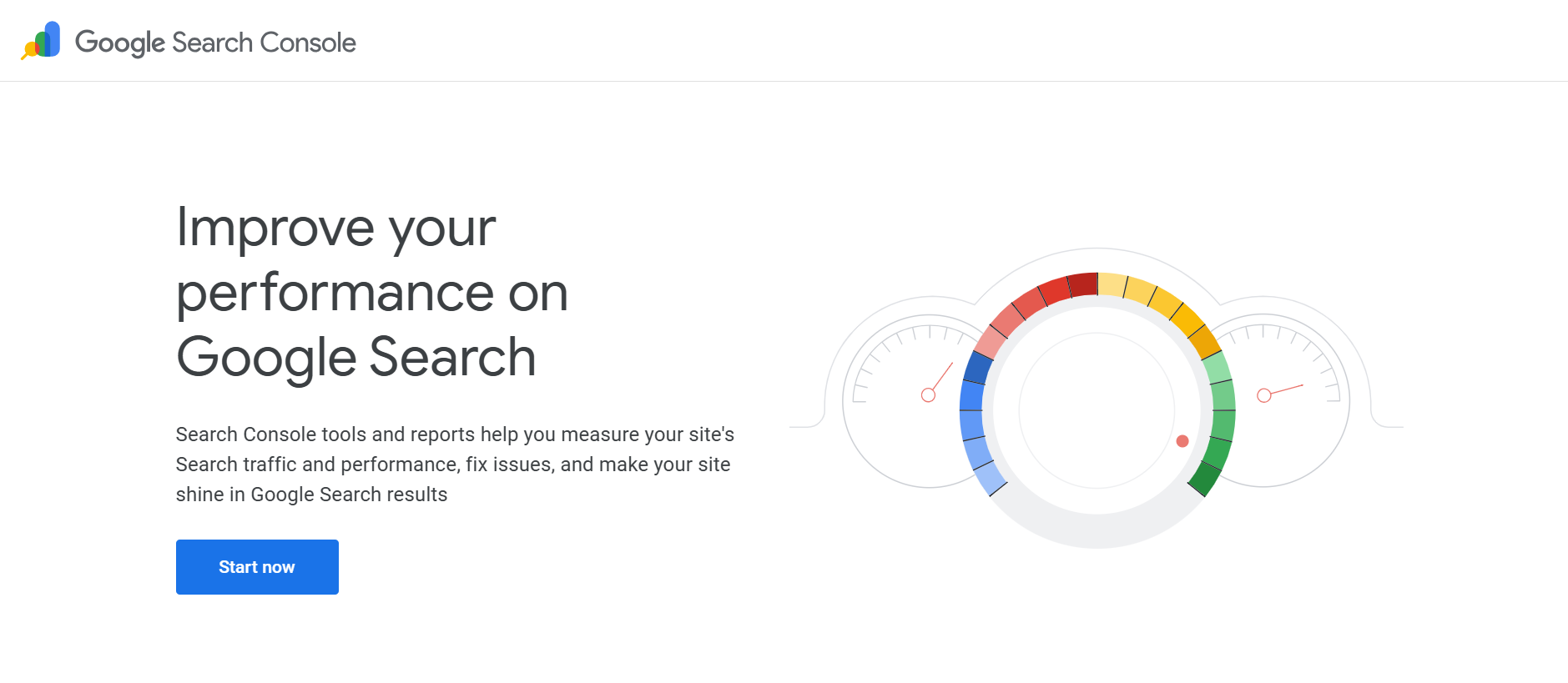
Best for: Website owners, SEOs, and developers who want first-party Google data on performance, indexing, and technical issues, without paying for a tool.
Google Search Console (GSC) is a free tool from Google that helps website owners, marketers, and SEO professionals understand how their site performs in Google Search and how Google interacts with their pages. While it isn’t required for your website to appear in organic search results, it plays a crucial role in helping you monitor, diagnose, and improve your visibility on Google. In many ways, it’s the closest thing you have to seeing your website through Google’s eyes.
At a high level, Search Console shows you how people discover your site. You can see which search queries trigger your pages, how many impressions and clicks you receive, where your pages rank on average, and how performance varies by country, device, or page. This makes it useful for understanding what content is already working, and where there’s room to improve visibility or click-through rates.
Beyond performance data, Search Console helps you understand how Google crawls and indexes your site. It flags pages that can’t be indexed, highlights crawl or coverage errors, and allows you to submit updated or new pages for indexing. If Google is struggling to access parts of your site, Search Console is usually the first place you’ll see it. For larger sites, this is critical for ensuring important pages aren’t silently excluded from search results.
That said, Search Console isn’t a complete SEO solution on its own. It only shows data for your own site, so there’s no visibility into competitors or SERP data. It also doesn’t provide reliable keyword search volume data, and its reporting and exports can feel limiting for deeper analysis. Because of this, Search Console works best as a foundational tool. It gives you accurate, first-party insights from Google, but you’ll still need third-party SEO platforms for more advanced or competitive research.
Primary Use Cases
- Performance monitoring: See which keywords drive traffic, track click-through rates, and identify pages gaining or losing visibility.
- Indexing status and troubleshooting: Verify that Google can crawl and index your pages. Identify and fix coverage errors.
- Mobile usability and page experience: Check Core Web Vitals scores and mobile usability issues that affect rankings.
- Backlink overview: View which sites link to yours (though the data is limited compared to dedicated backlink tools).
Shortcomings
- No competitor data: GSC only shows your own site’s performance. You can’t see how competitors rank for the same keywords.
- Delayed data: Reports are typically 2–3 days behind, making them unsuitable for real-time monitoring.
- Limited historical data: Most reports cap at 16 months, which can be problematic for long-term trend analysis.
- Basic visualization: The interface is functional but lacks the advanced reporting and graphing options found in paid tools.
Pricing Range: Free
Yoast SEO
Best for: WordPress users who need a reliable on-page SEO assistant to ensure content is properly optimized before publishing.
Yoast SEO is one of the most widely used SEO plugins for WordPress, and for many site owners, it’s often the first SEO tool they install. Its main purpose is simple: help you optimize content before it goes live, directly inside the WordPress editor. Instead of guessing whether a page is search-ready, Yoast gives you immediate feedback on what needs improvement.
The plugin focuses primarily on on-page SEO fundamentals. It guides you through optimizing title tags, meta descriptions, URLs, headings, and keyword placement, while also keeping an eye on readability. As you write, Yoast evaluates your content and flags potential issues, such as missing keywords in important sections, overly long sentences, dense paragraphs, or weak use of transition words. This helps you maintain a clear writing structure that works for both readers and search engines.
Yoast also includes a snippet preview that shows how your page may appear in Google search results. This makes it easier to adjust titles and meta descriptions so they’re appealing enough to earn clicks. In the premium version, Yoast adds AI-generated suggestions for metadata, which can save time if writing titles and descriptions tends to slow down your workflow.
On the technical side, Yoast handles several SEO essentials quietly in the background. It automatically generates XML sitemaps to help search engines discover and index your content more efficiently. You can also enable breadcrumbs, which improve site navigation and give Google a clearer context about your site’s structure. These features aren’t flashy, but they play an important role in maintaining long-term SEO health.
Still, Yoast has its limits. It doesn’t offer keyword discovery, competitor analysis, backlink data, or detailed performance tracking. Following its recommendations won’t guarantee higher rankings, either. Yoast can tell you whether a page is well optimized, but it won’t tell you whether the topic itself is worth targeting or how competitive your target queries might be.
Used in the right context, Yoast works best as a safety net. It helps prevent common on-page mistakes, enforces consistency, and keeps content clean and structured, particularly for WordPress-based teams. For beginners, it lowers the barrier to doing SEO correctly. But if you’re a more experienced SEO practitioner, it works best as a supporting tool for tweaking pages before they go live, rather than as your entire SEO solution.
Primary Use Cases
- Real-time on-page analysis: Get instant feedback on keyword usage, readability, and meta tag optimization as you write.
- Technical WordPress SEO: Automatically generates XML sitemaps, manages canonical URLs, and handles basic schema markup.
- Content readability scoring: Ensures your content is accessible to readers, not just search engines.
Shortcomings
- No rank tracking or performance data: Yoast helps you publish optimized content, but it doesn’t tell you how that content performs after publishing.
- Premium features locked behind a paywall: Advanced features like internal linking suggestions and redirect management require the paid version.
- Can slow down large sites: On sites with thousands of pages, the plugin can add overhead if not configured carefully.
Pricing Range: Free (basic) to Entry-level (premium)
Exploding Topics
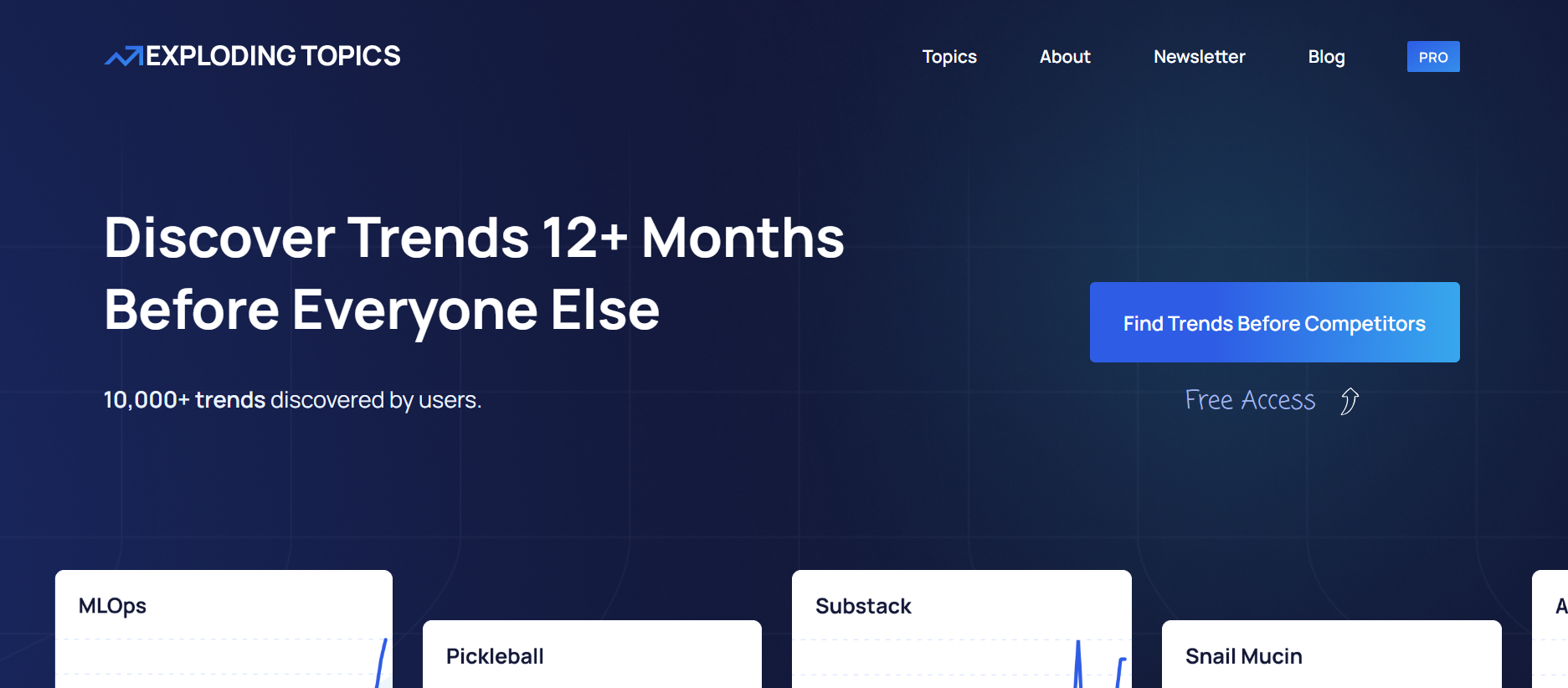
Best for: Content strategists and marketers who want to identify rising topics before competitors, and position themselves as early authorities.
Do you know why brands like HubSpot became so popular? It’s because they identified emerging problems early, gave those problems clear names, and then published some of the best content on the internet around them, before everyone else cared.
At the time, they didn’t even have tools like Exploding Topics. They relied on deep customer conversations and a lot of experimentation.
Exploding Topics exists today to systematize that advantage.
It is a trend-discovery tool built to help marketers, founders, and content teams spot what’s gaining momentum before it becomes mainstream. Instead of showing you keywords people are already competing for, it focuses on uncovering early-stage topics, products, startups, and technologies that are quietly growing in interest.
The platform works by analyzing massive amounts of data across searches, online conversations, and mentions to detect patterns of sustained growth. When a topic starts showing consistent upward movement, Exploding Topics flags it as “exploding.” This gives you a head start for when you’re planning blog content or YouTube videos.
One of its biggest strengths is how visual and intuitive it is. You can browse trends by broad categories like technology, business, health, beauty, or entertainment, then drill down into subcategories such as AI, software, wellness, or consumer products. Each trend comes with clear growth charts, timeframes (past growth and future forecasts), and context that helps you judge whether something is a short-term spike or a long-term opportunity.
Of course, there’s a fair question to ask here: if everyone is using a tool like Exploding Topics, does the advantage disappear? In theory, maybe. But in practice, spotting a trend is only the first step. The real edge comes from deciding which trends matter to your audience, having the conviction to act early, and doing the work to explain the topic better than anyone else.
That distinction is important because it also explains what Exploding Topics is and isn’t designed to do. Exploding Topics is not a keyword research tool. It doesn’t provide traditional SEO metrics like keyword difficulty, backlink data, or precise ranking opportunities. And it doesn’t help you design a strategy. Instead, it tells you what is gaining attention, not how competitive it is to rank for it. Most teams will still need to pair it with SEO tools like Google Search Console or NightOwl to validate demand and build a complete optimization strategy.
Primary Use Cases
- Early trend identification: Discover topics gaining traction 6–12 months before they peak in traditional keyword tools.
- Content planning and thought leadership: Build content around emerging topics while competition is low.
- Category-based exploration: Browse trends by industry or niche to find relevant opportunities.
Shortcomings
- No keyword metrics: Exploding Topics doesn’t provide search volume, difficulty, or CPC. You’ll need to validate trends with other tools.
- Ideas require execution elsewhere: The tool surfaces opportunities but doesn’t help you act on them. Pair it with a rank tracker and content platform.
- Signal vs. noise: Not every “exploding” topic translates to commercial value. Judgment is required.
Pricing Range: Free (limited) to Entry-level (full access)
AnswerThePublic
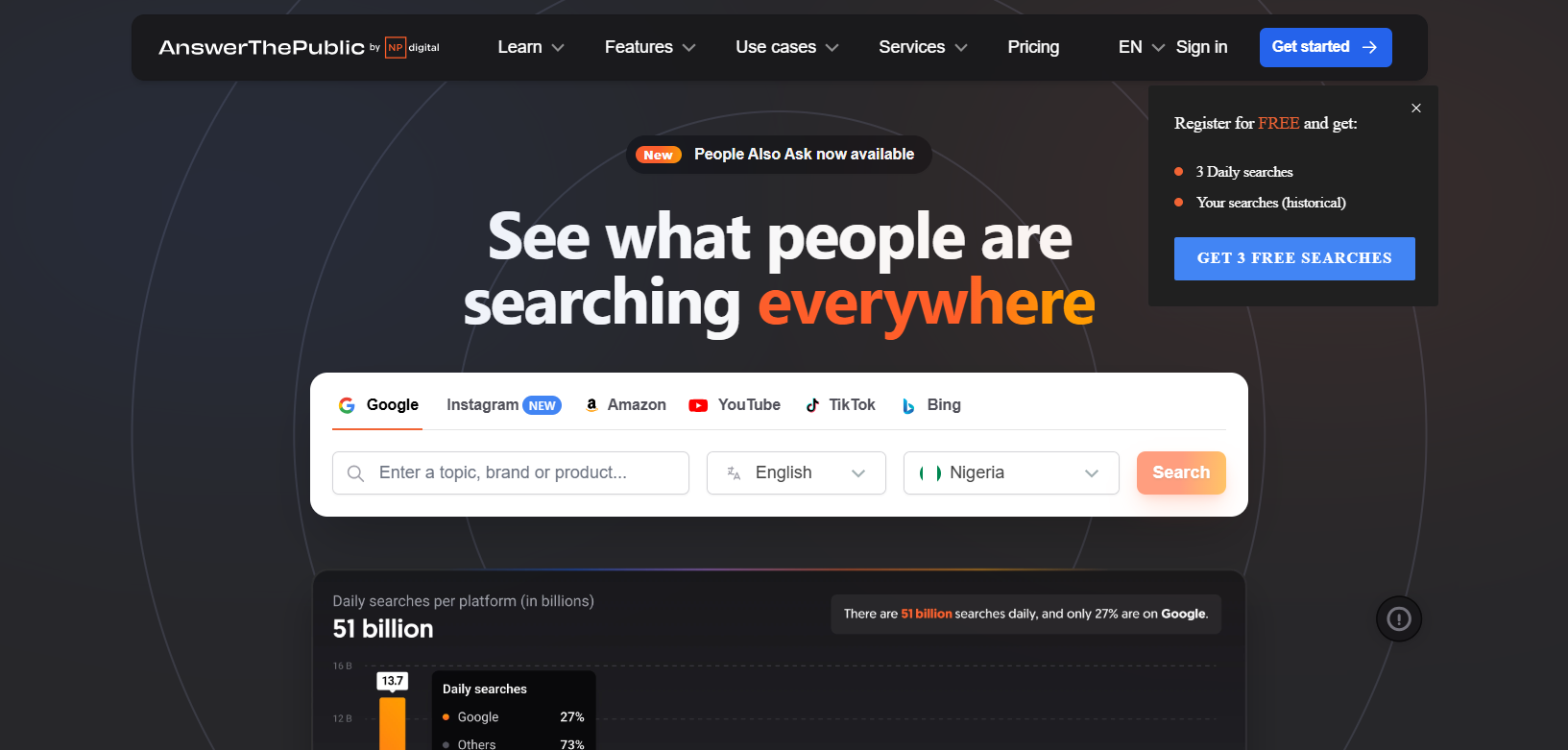
Best for: Content creators and SEO practitioners who need to understand what questions real users are asking around a topic.
At first glance, AnswerThePublic can feel a lot like Exploding Topics. Both tools pull you away from traditional keyword spreadsheets and toward something more human: curiosity. They’re both built around the idea that great content doesn’t start with metrics, but with understanding what people are interested in, confused about, or actively trying to solve. It helps you shift your focus from guessing what to write or publish to listening in on real search behavior.
The overlap ends there. Where Exploding Topics helps you spot what is beginning to gain momentum, AnswerThePublic zooms in on how people are thinking about a topic once that interest exists. It takes a single idea and fans it out into hundreds of real questions, comparisons, and phrases pulled directly from Google’s autocomplete data.
When you type in a broad topic, it immediately breaks it down into the questions people ask (“why,” “how,” “can”), the comparisons they make, and the angles they care about most. It puts you inside the searcher’s head, and helps you map your blog posts, FAQs, or long-form guides to the exact language people use when they’re trying to understand something.
The visual maps make this even more intuitive. You can quickly see which questions are more popular and which ideas are worth exploring further. Switch to data view, and the same insights become easier to sort, export, and build into an outline or content plan. Access to such data helps you work with a clear picture of user intent from the start.
In short, if Exploding Topics helps you choose the right conversation early, AnswerThePublic helps you carry that conversation well. It doesn’t tell you what will trend next, but it makes sure that when people are searching, your content actually answers what they’re asking.
Primary Use Cases
- Long-tail keyword discovery: Find question-based and conversational queries that indicate specific user intent.
- FAQ and content ideation: Generate dozens of content ideas from a single seed keyword.
- Understanding search behavior: See patterns in how users phrase queries (“how,” “why,” “vs.,” “near”).
Shortcomings
- No keyword metrics: You won’t see search volume, difficulty, or competition scores. The tool shows what people ask, not how often or how competitive.
- No SERP data: It doesn’t tell you what’s currently ranking for these queries or how hard it would be to compete.
- Limited free searches: The free version caps daily usage significantly.
Pricing Range: Free (limited) to Mid-range (team plans)
ChatGPT
ChatGPT has found its way into almost every content and SEO workflow, largely because it removes friction from the thinking and writing process. At its simplest, ChatGPT is a conversational assistant that responds to prompts with ideas, drafts, explanations, or rewrites. Where you once had to spend hours brainstorming ideas or stare at empty spreadsheets, marketers can start from something, and that alone saves time.
In day-to-day SEO work, ChatGPT is most useful behind the scenes. It helps generate blog ideas, shape rough outlines, suggest headline variations, and clean up awkward sentences. For example, you might ask, “Help me craft an outline for a blog post on the best pet food for dogs,” or “Brainstorm topic ideas for my blog about pet care.” And you’ll instantly get drafts you can work with.
Tasks like writing meta descriptions, improving clarity, or rewriting dense paragraphs become faster when you can ask for alternatives from ChatGPT. It’s also handy for breaking down technical concepts into simpler language when writing for non-technical audiences.
The real value shows up when ChatGPT is used alongside actual SEO data. By itself, it doesn’t know search volume, keyword difficulty, or what currently ranks on Google. But when you bring in insights from other SEO tools, such as underperforming queries, ranking drops, or impression trends, it can help you interpret that information and turn it into content improvements.
For instance, you could paste a list of queries and ask, “Suggest sections I could add to this article to better address these keywords,” or “Rewrite this paragraph to better match informational search intent.”
Using ChatGPT for SEO relies almost completely on the precision of your prompts and your creativity. Here are some examples of prompts you can try from our in-depth ChatGPT for SEO guide:
- “Create an SEO-optimized outline for a blog post titled ‘Best Digital Adoption Tools for Enterprises.’”
- “Write 5 meta titles under 60 characters for a blog about beginner SEO tips.”
- “Generate JSON-LD schema markup for a blog post about beginner SEO tips.”
Primary Use Cases
- Content ideation and outlining: Generate blog post ideas, content calendars, and article outlines based on target keywords.
- Drafting and rewriting: Produce first drafts, rephrase sections for clarity, or adjust tone for different audiences.
- Meta tag and schema generation: Create title tags, meta descriptions, and structured data markup with the right prompts.
- SEO concept explanation: Quickly understand technical SEO concepts in plain language.
Shortcomings
- No live SEO data: ChatGPT doesn’t know current rankings, search volumes, or SERP conditions. All data must be provided by you or another tool.
- Output quality varies with prompt quality: Vague prompts produce generic content. Specific, context-rich prompts are essential.
- Can generate inaccurate information — Always verify facts, statistics, and feature claims before publishing. ChatGPT hallucinates.
Pricing Range: Free (basic) to Entry-level (Plus)
Google Keyword Planner
Best for: SEO practitioners who want reliable, Google-sourced keyword data for planning content and understanding search demand
Google Keyword Planner sits quietly inside Google Ads, but it’s one of the few keyword tools that pulls data straight from Google itself. That alone gives it a certain weight. Once you’re inside, it lets you explore what people are actually searching for, and whether interest in a topic is rising or fading.
The tool is built around discovery. You can start with a few seed terms, paste in a competitor’s website, or point it at a specific page, and Google will suggest related keywords you might not have considered. Alongside each suggestion, you’ll see estimated search demand, broad competition levels, and CPC data. You also get direct access to relevant keyword opportunities, as longer phrases and lower-competition terms tend to surface quickly. For service-based or small businesses, this kind of insight can guide which pages are worth prioritizing.
Even if paid ads aren’t part of your plan, access to CPC data is a huge plus, as higher cost-per-click values often point to keywords with stronger buying intent. But it’s not a complete picture. Keyword Planner’s Search volume data comes in wide ranges instead of exact numbers, which limits precision. The competition labels reflect ad auctions, not organic rankings, and there’s no visibility into SERP features, backlinks, or what competitors are actually outranking you with. On its own, it won’t tell you how hard ranking will be.
Primary Use Cases
- Keyword discovery: Find related keywords based on a seed term, URL, or product category.
- Search volume and CPC data: Access Google’s own data on how often keywords are searched and what advertisers pay per click.
- Seasonal trend identification: Compare keyword interest over time to spot seasonal patterns.
Shortcomings
- Broad volume ranges: Without active ad spend, you’ll see ranges like “1K–10K” rather than precise numbers.
- No organic difficulty scores: The tool focuses on paid competition, not how hard it is to rank organically.
- Advertiser-first interface: The UI is built for Google Ads campaigns, which can feel clunky for pure SEO use cases.
Pricing Range: Free (requires Google Ads account)
Keysearch
Best for: Freelancers, bloggers, and small teams who need a capable SEO suite without enterprise pricing.
Keysearch sits in that sweet spot between simplicity and depth. It’s built for people who want to make smart SEO decisions without paying enterprise-level prices or wrestling with overly complex dashboards. Freelancers, bloggers, and small teams often gravitate toward it because it feels approachable while still offering enough data to guide real strategy.
Keysearch doesn’t try to be everything. What it does well is give you practical, readable data that helps you make better keyword and content decisions, without draining your budget or your energy.
This is how it works: You enter a keyword, choose your location, and Keysearch returns search volume, competition level, and trend data in a way that’s easy to interpret at a glance. Competition scores are color-coded and labeled clearly, which removes a lot of guesswork for beginners who might struggle to interpret raw numbers.
Beyond surface-level keyword ideas, Keysearch gives you a clear look at what you’re up against. Its SERP analysis breaks down the pages already ranking on page one, and shows you data, such as domain authority, backlinks, and page strength. This makes it easier to answer the question that really matters: Can my site realistically compete here?
There’s even a lightweight site audit feature for those who want a high-level view of technical SEO issues. It’s not meant to replace a full technical audit, and it can feel overwhelming at first, but it helps build awareness around common problems like missing tags or crawl issues.
Primary Use Cases
- Keyword research with competition scores: Find keywords with realistic ranking potential based on competition analysis.
- Rank tracking: Monitor keyword positions over time (though with less granularity than specialized trackers).
- Content optimization: Get on-page suggestions for improving individual posts.
- Competitor keyword analysis: See which keywords competitors target and identify gaps.
Shortcomings
- Limited data depth: The database isn’t as comprehensive as enterprise tools, which can matter for niche or international markets.
- Interface feels dated: The UX lags behind more modern platforms, though functionality is solid.
- Not built for large-scale operations: Agencies managing many clients or tracking thousands of keywords may find it limiting.
Pricing Range: Entry-level
Perplexity
Best for: Content creators and researchers who need AI-powered search with real-time data and source citations for improving content authority and depth.
Research usually breaks down in one of two ways: you either get creative answers with questionable accuracy or accurate information buried under too many links. Perplexity was built to sit between those extremes. It’s less concerned with helping you “write something clever” and more focused on helping you understand what’s actually true, quickly and with receipts.
Perplexity works like a search engine that explains itself. You ask a question, and instead of returning a list of blue links, it gives you a direct answer pulled from live web sources, with citations attached to each claim. This is useful when you’re dealing with topics where accuracy matters, such as recent news, technical troubleshooting, health or product research, or anything that changes faster than a static blog post can keep up with.
It helps you validate claims, uncover supporting data, and gather credible references without opening a dozen tabs. If you’re writing about a new industry trend, a technical concept, or a data-heavy topic, it can quickly give you context, statistics, and explanations that strengthen your content’s authority.
Perplexity does have limits. It’s not designed for high-energy creative work, catchy headlines, or bold brand voice experimentation. It’s less of a writing tool and more of a research assistant. It won’t replace keyword tools or content optimizers like NightOwl and ChatGPT, but it fits neatly into modern workflows where credibility, speed, and source-backed answers matter just as much as rankings.
For instance, you can use Perplexity to research external linking opportunities, then incorporate those citations into your content to improve E-E-A-T signals. Check out our AI content optimization guide to learn more.
Primary Use Cases
- Research with citations: Get answers with linked sources you can verify and cite, unlike ChatGPT’s unattributed outputs.
- Competitive research: Quickly understand what competitors are publishing and which sources they’re citing.
- Content depth improvement: Find data points, studies, and expert perspectives to strengthen your content’s authority.
- AI search behavior analysis: Understand how AI search engines synthesize and present information, useful for optimizing content for AI visibility.
Shortcomings
- Not a traditional SEO tool: No keyword research, rank tracking, or site auditing capabilities.
- Accuracy varies by topic: For niche subjects, source quality and relevance can be inconsistent.
- No integrations with SEO platforms: Data stays in Perplexity; you’ll need to manually transfer insights to your SEO workflow.
Pricing Range: Free (basic) to Entry-level (Pro)
SEO Tools Comparison Table
The table below brings all the tools together at a glance. It highlights what each tool is actually good at, where it fits in an SEO workflow, and when it makes sense to use it alongside others. Most teams get the best results by combining two or three of these tools rather than relying on just one. If you’re skimming or trying to decide which tools deserve your time (or budget), this is the fastest way to compare them without wading through every section again.
| Tool | Best For | Core Capabilities | Ease of Use | Pricing Range | Main Limitation |
|---|---|---|---|---|---|
| Nightwatch | Agencies, SEO pros needing accurate rank tracking | Daily rank tracking, 100k+ locations, multi-site, white-label reports, AI search visibility | Moderate | Entry-level to Mid-range | Backlink monitoring is not a core strength |
| NightOwl | Teams automating SEO workflows | AI keyword research, technical audits, content briefs, clustering with real data | Easy | Included with Nightwatch | Requires clear prompting; not a content writer |
| Google Search Console | Everyone | First-party Google data, indexing status, performance reports | Easy | Free | No competitor data, delayed reporting, limited history |
| Yoast SEO | WordPress publishers | On-page analysis, meta tags, sitemaps, readability | Easy | Free to Entry-level | No rank tracking or performance data; no keyword research data |
| Exploding Topics | Trend hunters, content strategists | Early trend discovery, category browsing | Easy | Free to Entry-level | No keyword metrics; ideas need validation |
| AnswerThePublic | Content ideation, FAQ planning | Question-based keyword visualization | Easy | Free to Mid-range | No search volume, difficulty, or SERP data |
| ChatGPT | Content drafting and ideation | Outlining, rewriting, meta tags, schema generation | Easy | Free to Entry-level | No live SEO data; output varies with prompts |
| Google Keyword Planner | Keyword validation, demand research | Google-sourced volume and CPC data | Moderate | Free | Broad volume ranges; advertiser-focused UI |
| Keysearch | Budget-conscious freelancers, small teams | Keyword research, rank tracking, competitor analysis | Easy | Entry-level | Limited data depth; dated interface |
| Perplexity | Research and citations | AI search with sources, competitive research | Easy | Free to Entry-level | Not a traditional SEO tool; no integrations |
Note: Pricing ranges are indicative and may vary by plan, usage level, or promotional offers. Always check current pricing on each tool’s website.
Now That You Know the Best SEO Tools—Put Them to Work
By now, it should be clear that no single SEO tool can carry an entire strategy. Every platform has limits, and effective SEO comes from combining tools so each one fills a specific gap. This guide is meant help you understand what each tool does well, and how to use them together in a way that matches how you actually work.
Google Search Console, for example, is excellent for tracking impressions, clicks, and page-level performance, but it doesn’t show precise keyword positions. Nightwatch is built for that. It offers daily, location-specific rank tracking across search engines. In the same way, ChatGPT is useful for drafting and refining content, but it needs real SEO data to be reliable. NightOwl provides that context, and helps you turn ideas into decisions backed by actual search signals.
This setup keeps costs reasonable. You’re paying for one core tool (Nightwatch) while using NightOwl alongside free tools like Google Search Console and ChatGPT. If you want to see how it fits your workflow, you can try Nightwatch with a 14-day free trial and test it properly before committing.
Frequently Asked Questions
Which SEO tool is best for small businesses?
For small businesses with limited budgets, start with Google Search Console (free, essential) and Keysearch (affordable keyword research and tracking). If you need more accurate rank tracking as you grow, Nightwatch’s entry-level plan provides daily updates and location-specific data that budget tools can’t match. The key is choosing tools that match your current needs without paying for enterprise features you won’t use.
What are the best SEO tools for agencies?
Agencies need multi-site management, white-labeled reporting, and scalable pricing. Nightwatch handles all three. You can manage up to 50 sites with customizable, brandable reports for clients. For AI-assisted workflow automation, NightOwl helps agencies scale keyword research and technical audits across client accounts. Pair these with Google Search Console access for each client, and you have a solid agency stack.
Can ChatGPT do SEO?
ChatGPT can assist with SEO tasks, but cannot do SEO on its own. It’s effective for brainstorming content ideas, drafting outlines, writing meta descriptions, and explaining technical concepts. However, it doesn’t track rankings, audit sites, or access live keyword data. Use it as a productivity tool alongside data-driven platforms like Nightwatch and Google Search Console, not as a replacement for them.
What is the most effective tool for SEO?
There’s no single “most effective” tool because SEO involves multiple disciplines. For rank tracking, Nightwatch provides the accuracy and location granularity that matters. For first-party performance data, Google Search Console is irreplaceable. For workflow automation, NightOwl accelerates research and audits. The most effective approach is building a toolkit where each tool handles what it does best.
Which SEO tools are best for rank tracking accuracy?
For accuracy, prioritize tools that offer daily updates, location-specific tracking, and device segmentation. Nightwatch tracks rankings from 100,000+ locations with daily precision, which is critical for local SEO and multi-location businesses. Avoid tools that rely on weekly updates or aggregated location data, by the time you see changes, competitors may have already responded.