Multi-Location SEO: How to Track Rankings Across Cities, ZIP Codes & Countries
Quick Takeaways
- A single national keyword ranking tells you nothing about what customers in a specific city or ZIP code actually see
- Accurate multi-location tracking requires three surfaces per location: map pack, localized organic, and AI citations
- Mixing language and region parameters when tracking international rankings produces data you can’t trust
- ZIP-code-level tracking is no longer optional for service-area businesses. It’s the baseline
- One tracking architecture can cover cities, ZIPs, and countries without rebuilding from scratch for each location
Introduction
Most rank trackers report one number per keyword. That number is a city-centre average, a composite of queries from a point on the map that may not correspond to where any of your actual customers are searching from.
For a single-location business, that’s a minor limitation. For a business with locations in eight cities, or a service-area brand covering 30 ZIP codes, or an international site running across five countries, it means your ranking data is describing a version of your SEO performance that doesn’t exist anywhere in the real world.
Multi-location SEO tracking is a different problem from standard rank tracking. It’s not about checking more keywords. It’s about checking the right keywords from the right places, across the right surfaces, and making that data navigable without drowning in projects.
This guide covers the five tracking layers you need, how to set them up in Nightwatch, and how to manage local SEO rankings across cities, ZIP codes, and countries without the data becoming unmanageable.
Why one ranking number lies to you
Standard rank tracking works by querying Google from a general location and recording where your page appears. For many keywords, that’s fine. For location-sensitive queries, it’s nearly useless.
Google doesn’t serve a universal result for searches like “emergency plumber” or “best accountant near me.” It returns results based on the searcher’s physical location, combining proximity, relevance, and prominence differently for each query. Someone five miles from your office sees a different map pack than someone ten miles away.
As Almcorp notes, standard rank trackers don’t account for the distance-dependent nature of Google Maps results. They return a position based on a city-centre query point, which may bear little resemblance to what your actual customers see from their homes, offices, or phones.
The gap between national average rank and what a customer actually sees
Say your national average for “roofing contractor” is position 3. In your strongest market, you’re in the map pack. In two other cities where you have branches, you’re on page two, because your Google Business Profile there has fewer reviews, and your local landing page is thin. The average rank of 3 obscures both the win and the problem.
Joy Hawkins of Sterling Sky described the December 2025 core update as the most dramatic local SEO update she had ever experienced. Distance-dependent ranking signals became more pronounced, and businesses tracking a single position per keyword started noticing bigger discrepancies between their dashboard and reality.
If you’re managing multiple locations, a single number is a liability.
The five tracking layers for multi-location SEO
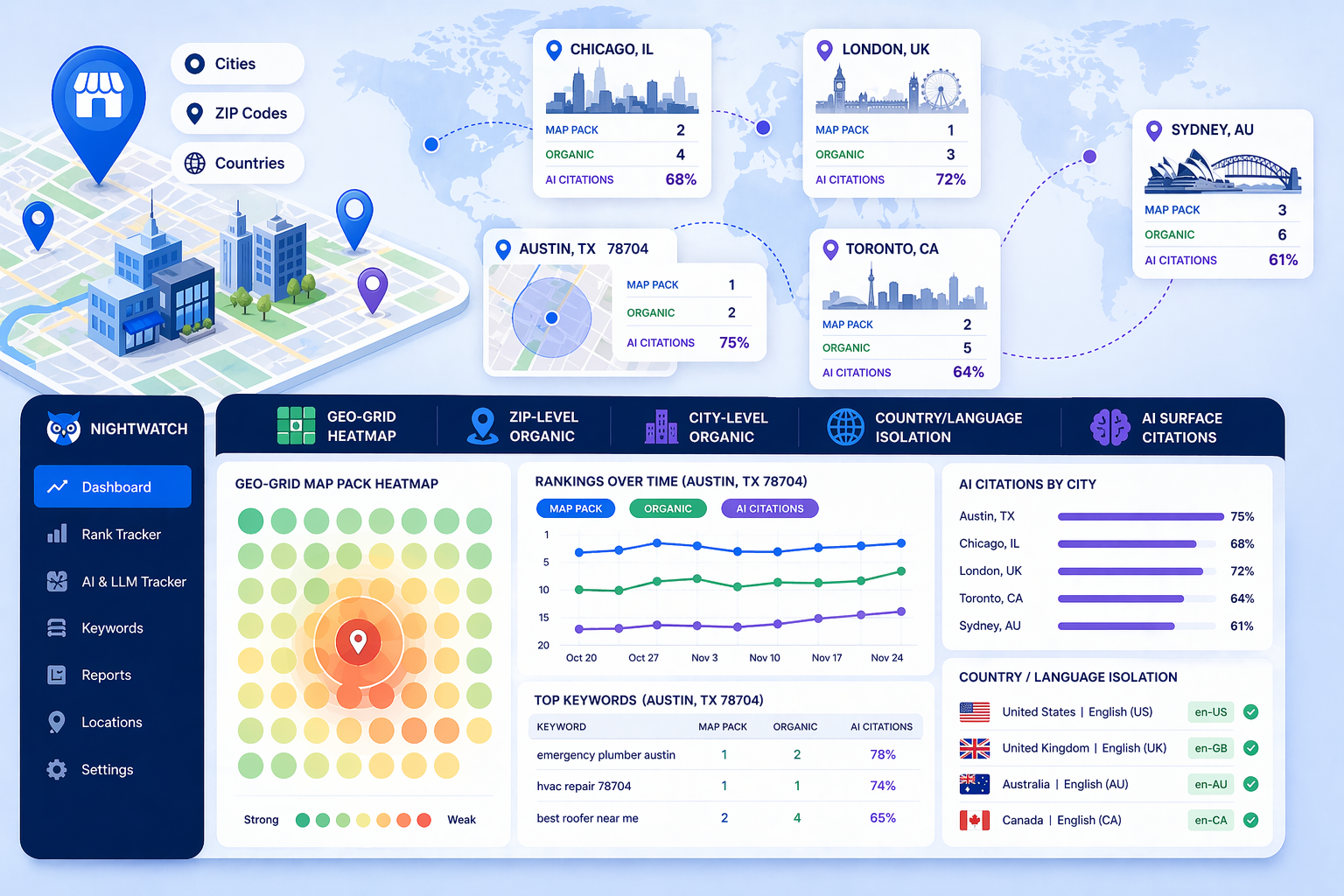
There’s no single project type that covers everything. Multi-location tracking needs five parallel layers, each measuring something the others miss.
| Layer | What it measures | Cadence | Best for |
|---|---|---|---|
| Geo-grid (lat/long) | Map pack visibility across a heatmap grid | Weekly | Businesses with physical locations |
| ZIP/postal-code organic | Localized organic rankings per service area | Weekly | Service-area businesses without a storefront |
| City-level organic | Branded + non-branded rankings with city modifier | Weekly | Multi-city brands tracking share of voice |
| Country/language isolation | Rankings with strict gl/hl parameters per country | Weekly | International businesses |
| AI surface citations | Brand mentions in ChatGPT, Perplexity, AI Overviews | Monthly | Any brand with AI search exposure |
Layer 1: Geo-grid tracking
Geo-grid tracking places a grid of virtual query points (typically 5x5 to 9x9) around a physical address and checks your map pack position at each point. The output is a heatmap showing where you’re visible, where you’re weak, and how far your local radius extends.
Whitespark’s 2026 report officially elevated geo-grids to core reporting, moving them from “advanced” to standard practice. For businesses with physical locations, running a 7x7 or 9x9 grid weekly is now the baseline, not the advanced option.
Layer 2: ZIP/postal-code organic tracking
Geo-grids show map pack positions. They don’t cover localized organic results for service-area businesses that don’t have a storefront Google can anchor a grid around.
ZIP-code tracking solves this using uule parameters, a Google encoding that sets the searcher’s location to a specific postal code. You track your target keywords from inside each ZIP you serve, seeing the organic results your customers see there.
This layer is especially important for home services, healthcare, legal, and financial businesses that serve defined geographic areas without a physical location in each one.
Layer 3: City-level localized organic
Beyond ZIP codes, city-level tracking captures both branded and non-branded queries, with and without the city modifier. Tracking “accountant Chicago” and “accountant” from a Chicago query point gives you different data, and you need both.
As Sandeep Goel outlined, per-location landing pages with city keywords, embedded Maps, localized testimonials, and location schema are now table stakes for multi-location brands. City-level rank tracking tells you whether those pages are actually performing.
Layer 4: Country and language isolation
International tracking is where most teams make a single mistake that corrupts all their data. Mixing gl (country) and hl (language) parameters across countries means you’re not seeing country-specific results. You’re seeing a blended signal that corresponds to no real user.
Motoko Hunt of AJPR found that most reported “international drops” are measurement artifacts from bad gl/hl configuration rather than actual ranking losses. Tracking en-US and en-GB as separate projects, with clean parameter isolation, is the only way to know what’s really happening per country.
Layer 5: AI surface citations per location
AI Overviews, ChatGPT, and Perplexity don’t return results the same way for every location. A prompt like “best plumber in Austin 78704” pulls different sources than “best plumber in Denver.” If you’re not tracking your AI citation rate per city, you have a blind spot on a surface that’s increasingly where purchase decisions start.
As GMB Mantra puts it, tracking your map pack position alone gives you half the picture. You need a unified view of map pack, organic, and AI visibility per ZIP to see what’s actually happening.
How to set up location tracking in Nightwatch
Nightwatch’s ZIP-code-level tracking covers 107,000+ locations, including both map pack (Local Pack rank) and localized organic in the same platform. Here’s how to configure it for multi-location use.
Setting up Local Pack rank tracking
Local Pack rank tracking in Nightwatch requires a registered Google Business Profile. Once you have one:
- Step 1: From the left sidebar, click Settings on your website project.
- Step 2: In the Google Place field, enter your exact registered Google Business Profile name.
- Step 3: Click Save URL. Your project is now configured to track Local Pack rank.
- Step 4: From the left sidebar, click Keywords, then click the pencil icon on any column header.
- Step 5: From the column options, select Local Pack rank as a display column.
Your Local Pack rank will now appear alongside your standard organic position for each keyword, letting you see both surfaces in one view.
Adding ZIP-code and city-level keyword projects
For ZIP-code and city-level organic tracking, you create separate tracking projects per location:
- Step 1: Click Add URL in the left sidebar.
- Step 2: Enter your URL, then select the country and language for the project. For ZIP-code tracking, select the country first, then specify the city or ZIP in the location field.
- Step 3: Add your keywords. Include both city-modified terms (“roofing contractor Chicago”) and unmodified terms to be tracked from within that location.
- Step 4: Set up keyword Views (segments) by location, so you can see each city or ZIP as a clean filtered report without scrolling through your full keyword list.
Configuring country isolation for international tracking
For international properties, create one project per country/language combination. In the setup flow, select the precise gl/hl pairing, for example United Kingdom / English (UK) as a separate project from United States / English (US). Never combine them in a single project.
Nightwatch supports 170+ languages and 190,000+ global locations, so there’s no reason to blend. Clean separation from day one means your trend data is reliable from the start.
[INSERT SCREENSHOT: Nightwatch location and language selector showing country-specific options]
What does “tracking AI results by location” actually mean?
AI search is localized, but not in the same way Google Maps is. There’s no geo-grid equivalent for ChatGPT. Instead, location enters through the prompt itself, and that makes prompt design the tracking unit, not a lat/long coordinate.
How AI Overviews and LLM citations vary by location
When someone types “best HVAC company in Phoenix” into ChatGPT or searches that phrase and triggers a Google AI Overview, the model pulls from sources it associates with Phoenix-specific authority: local directories, location pages, review platforms, and publications covering that market. The same prompt for “best HVAC company in Seattle” pulls different sources entirely.
BrightLocal’s 2026 predictions introduced “Agent-Readiness” grading, assessing whether booking forms, inventory data, and hours are structured correctly for AI agents to act without a human ever visiting your site. Location schema, structured hours, and service-area data directly affect whether AI models include your business in location-specific responses.
Using Nightwatch’s AI & LLM Tracker to monitor citation share per city
Nightwatch’s AI and LLM Tracker monitors brand mentions across ChatGPT, Perplexity, Google AI Mode, and AI Overviews. For multi-location businesses, the approach is to build location-specific prompt sets (one cluster per city or region) and track your citation rate per cluster.
A prompt set for Austin might include queries like “best roofing company in Austin,” “roofing contractor South Austin,” and “who does roof repair in 78704.” Track those prompts monthly and you get a citation share score per city, not just a global AI visibility number.
This sits within Nightwatch’s AI Visibility Score, the percentage of tracked prompts where your brand appears, broken out by the prompt sets you define. Combine it with your local organic and map pack data, and you have a complete picture per location.
Multi-location tracking for agencies: keeping clients from drowning in data
If you’re managing local SEO for multiple clients, or a single client with dozens of locations, the tracking architecture above can scale cleanly, but only if you build the reporting layer alongside it.
Does every location need its own project?
Yes, if the locations have meaningfully different search environments (different cities, different service areas, or different languages). No, if you’re tracking variations of the same location. For example, multiple keywords from the same city-centre point.
The practical rule: one project per location per language. A client with eight locations across three cities gets at minimum eight projects. Nightwatch’s folder system lets you group these by client, region, or location type so navigating between them doesn’t become the problem.
As one Entrepreneur contributor put it, if each new location depends on manual effort, growth plateaus. But if each location plugs into a repeatable structure, you scale predictably. The same logic applies to tracking: set up a standard project template once and replicate it per location.
Structuring reports so each client sees their own data
Nightwatch’s reporting feature lets you build scheduled reports from a drag-and-drop builder, using only the keyword lists, views, and graphs you choose. For agency use, you can:
- Build a location-specific View that filters for keywords assigned to that location
- Add that View to a report alongside the Local Pack rank column and the AI citation data
- Schedule the report weekly or monthly with a white-label logo and the client’s branding
Each client or location manager gets a report showing only their performance, not the full account. That’s managed entirely within Nightwatch’s reporting and white-label settings, with no need for separate logins or accounts per location.
For a deeper look at local SEO reporting, including how to structure reports that actually drive decisions, there’s a full guide on the Nightwatch blog.
International rank tracking: the one rule most teams break
Multi-country tracking fails for one reason more than any other: tracking both countries in the same project.
Why mixing gl/hl parameters corrupts your data
Google uses two parameters to serve localized results: gl (the country) and hl (the interface language). Tracking a site in a project set to en-US when you’re trying to understand its UK rankings means Google is returning American results. The UK data doesn’t exist in that project. You just don’t know it.
Motoko Hunt’s 2026 analysis found that most reported international ranking drops are measurement artifacts from poorly configured language and region parameters, not actual ranking losses. Teams make changes trying to recover visibility that was never lost.
Strict parameter isolation per country is the fix. It sounds obvious, but it’s the exception, not the norm.
Setting up clean country-isolated projects in Nightwatch
When you add a URL in Nightwatch, the country and language dropdowns set the gl/hl values for every keyword in that project. Create one project per country/language combination and never mix them.
For a business operating in the US, UK, Australia, and Canada, that means four separate projects for the same URL, each tracking the same core keywords but from within the correct regional and language context. Nightwatch’s localization depth across 190,000+ global locations means you can be precise at every level, from country down to postal code.
Pair that with clean naming conventions (e.g., Domain | Country | Language | Location Type) and your international tracking becomes navigable, not a naming mess you’ll regret six months from now.
If you’re running ecommerce across multiple countries, the ecommerce international SEO post on the Nightwatch blog covers the content and hreflang side of the equation alongside the tracking setup.
Multi-location SEO tracking: putting the architecture together
A complete multi-location tracking setup runs four parallel project types per location:
- Geo-grid (7x7 or 9x9, weekly): for businesses with a physical address
- ZIP organic (5–10 ZIPs per market, weekly): for service-area coverage without a storefront
- City organic (weekly): branded and non-branded city-modified keywords
- LLM citation sweep (20–40 prompts per city, monthly): AI surface share per location
The governance layer that holds it together: consistent NAP data across all profiles, per-location landing pages with location schema, and strict country/language isolation for international properties.
If you’re comparing platforms for this kind of setup, the best local rank tracking tools guide covers the current options and what each one does well.
The tracking architecture described here isn’t complex. It’s just four project types run consistently. Most teams that struggle with multi-location SEO don’t have a strategy problem. They have a measurement problem. Once you can see what’s actually happening per location, the fixes become obvious.
Start with a free Nightwatch trial and set up your first ZIP-code or city-level project. The difference between a national average and a per-location view is usually the difference between knowing you have a problem and knowing exactly where it is.