Rank Tracking: The Complete Guide for 2026
Rank tracking is the backbone of every serious SEO program. Without it, you are flying blind — publishing content, building links, and making technical changes with no reliable feedback loop to tell you whether any of it is working.
This guide covers everything you need to know: what rank tracking actually is, how search engines serve position data, what variables affect your numbers, how to set up tracking correctly in Nightwatch, and how to translate raw position data into decisions that move the needle.
Whether you are an in-house SEO, a freelancer, or an agency managing dozens of clients, this is the reference you need.
Quick Takeaways
- Rank tracking monitors where your pages appear in search results for specific keywords over time — it is the primary feedback loop for every SEO strategy.
- Positions vary by search engine, device, location, and language; accurate tracking requires you to measure each dimension separately.
- The metrics that matter go beyond raw position: search visibility, SERP feature presence, and competitor movements all add essential context.
- Meaningful rank changes are trend-based, not single-day fluctuations — always analyze data over weeks or months before acting.
- Agencies need segmentation, white-label reporting, and client dashboards to scale rank tracking across multiple sites and stakeholders.
- Common mistakes — tracking irrelevant keywords, ignoring mobile, and conflating branded with non-branded terms — silently corrupt your data and lead to bad decisions.
Table of Contents
- What Rank Tracking Is and Why It Matters
- How Rank Tracking Works
- What to Track: The Full Picture
- How to Set Up Rank Tracking in Nightwatch
- How to Interpret Rank Data
- Rank Tracking for Agencies
- Common Rank Tracking Mistakes and How to Avoid Them
- FAQ
What Rank Tracking Is and Why It Matters
Rank tracking — also called keyword rank tracking or SEO rank tracking — is the ongoing process of recording where your web pages appear in search engine results pages (SERPs) for a defined set of keywords, then monitoring how those positions change over time.
It sounds simple, but the implications are broad. A single position change on a competitive keyword can represent thousands of dollars in monthly traffic value. A steady decline across a cluster of related keywords can signal an algorithmic penalty, cannibalisation, or a competitor who has simply out-executed you on content quality.
Why rank tracking is the core feedback loop of SEO
SEO has a notoriously long feedback cycle. You publish or update a page, wait for Google to crawl and index it, and then wait again for the algorithm to decide how to rank it. Without systematic rank tracking, you lose the ability to:
- Confirm that changes worked. Did updating that page’s content actually improve its position? Rank tracking gives you the before-and-after data.
- Spot problems before they affect revenue. A 10-position drop on a high-value keyword discovered at week 1 is far easier to address than the same drop discovered at week 8 when traffic has already collapsed.
- Understand your competitive landscape. The SERP is a zero-sum game. When you gain a position, someone else loses one. Tracking competitor rankings alongside your own tells you who you are fighting for every click.
- Report progress with confidence. Clients and stakeholders do not care about your DA score or your crawl budget. They care whether your work is making them more visible. Rank data, tied to traffic and conversion trends, is the clearest proof you have.
- Detect algorithm updates early. Google runs thousands of algorithm experiments each year and confirms only a fraction of them publicly. Broad, sudden ranking changes across many keywords — especially when they coincide with industry-wide chatter — almost always signal an update. SERP monitoring gives you the earliest possible warning.
Rank tracking is also foundational to SEO performance reporting. Without a consistent historical record of where you ranked, you cannot produce reports that accurately attribute traffic changes to SEO work.
How Rank Tracking Works
Modern rank tracking tools work by programmatically querying search engines for specific keyword + location + device combinations on a regular schedule, then storing the resulting position data in a database for trend analysis.
Google SERP data and how tools collect it
When a rank tracker checks a keyword, it simulates what a real user in a given location would see if they searched that term on a given device. The tool records:
- The absolute position of your URL (e.g., position 4 in organic results)
- Whether your URL appears in any SERP features (featured snippet, image pack, local pack, etc.)
- The positions of any tracked competitor URLs for the same keyword
This data is then stored against a timestamp, allowing the tool to build a time-series chart of ranking history.
Some tools use their own proxy infrastructure to query Google directly. Nightwatch, for instance, uses a globally distributed network to query local SERPs accurately, which matters enormously for businesses targeting specific cities or regions. For teams that want to build custom pipelines on top of this data, a SERP API provides direct programmatic access to search result data.
Crawl frequency
How often a tool checks rankings matters. Daily rank checks give you a tighter feedback loop — you can see which day a ranking changed and correlate it with a deployment, a competitor’s update, or a confirmed algorithm rollout. Weekly checks smooth over noise but can obscure the timing of real changes.
For most websites, daily tracking on priority keywords and weekly tracking on long-tail or lower-priority keywords is a practical balance.
Location variables
A search for “plumber” in Chicago returns different results than the same search in Los Angeles or London. Search engines personalise results heavily by location, which means rank tracking must be equally localised.
Most tools let you specify a target location at the country, state/region, or city level. For businesses with physical locations or geographically scoped services, tracking at the city level is essential. Local SEO strategies in particular live or die by city-level rank data — a #1 ranking in one neighbourhood can be a #12 ranking five miles away.
Device variables
Google uses mobile-first indexing, meaning it primarily uses the mobile version of a page to determine rankings. However, desktop and mobile SERPs still return meaningfully different results for many queries — different SERP features, different competitor ordering, and occasionally different organic rankings.
Always track your most important keywords on both desktop and mobile. If your site has poor Core Web Vitals on mobile, for example, you may rank well on desktop while quietly losing mobile positions — a gap that only device-segmented tracking reveals.
Search engine variables
Google dominates global search, but Bing, Yahoo, and DuckDuckGo hold meaningful market share in some regions and demographics. Nightwatch supports tracking across all major search engines, so if any portion of your audience reaches you through Bing, you can track and optimise for that channel too.
What to Track: The Full Picture
Rank position is the headline number, but it is far from the only thing worth tracking.
Position
Raw keyword position remains the primary metric. Track it at the URL level — which specific page ranks for which keyword — not just at the domain level. This matters because different pages compete for different queries, and conflating them obscures cannibalisation problems and content gaps.
Search visibility
Search visibility is a composite score that reflects your share of possible clicks across all tracked keywords. It accounts for both your positions and the relative search volumes of those keywords, so a site that ranks #1 for a high-volume term will score higher than one that ranks #1 for a dozen near-zero-volume terms.
Use visibility as a high-level health indicator. Steady growth in visibility over months is a strong signal that your overall SEO strategy is working, even if individual keyword positions fluctuate.
SERP feature presence
Today’s SERPs are far more complex than a list of ten blue links. Google regularly surfaces:
- Featured snippets — the “position 0” answer box above organic results
- People Also Ask boxes
- Local packs — the map-based cluster of local business results
- Image and video carousels
- Knowledge panels
- Shopping results
- Sitelinks
Tracking whether your pages appear in these features — and whether you hold or lose featured snippet positions — is part of SERP analysis. A featured snippet can drive more clicks than a standard #1 ranking. Losing one to a competitor is a meaningful traffic event even if your organic position does not change.
Competitor positions
Rank tracking without competitor data is incomplete. You need to know not just where you rank, but where your specific competitors rank for the same keywords. This is how you identify:
- Keywords where a competitor outranks you by only a few positions (high-priority optimisation targets)
- Keywords where you have a clear lead (and need to maintain it)
- New competitors entering your keyword space
- Competitor content investments that are paying off (and what you should study)
Local rankings
For multi-location businesses, franchises, or any site with location-specific landing pages, local rank tracking deserves its own segment. A restaurant group that operates in ten cities needs to know how it ranks in each city independently, not just nationally. Tools like Nightwatch let you set up location-specific keyword tracking down to the city level, feeding directly into a local SEO strategy that is actually grounded in data.
Mobile vs. desktop rankings
As noted above, always segment by device. Beyond the indexing implications, mobile rankings affect a significant majority of searches across most industries. If your mobile positions are 5–10 spots worse than desktop for the same keywords, that is a concrete problem to solve — and one you will never find if you only track one device.
How to Set Up Rank Tracking in Nightwatch
Here is a practical, step-by-step walkthrough for getting rank tracking running in Nightwatch.
Step 1: Add your website
After logging in to Nightwatch, create a new URL (your website). You will enter your domain and select your primary search engine and country. This becomes the “home base” for all keyword tracking under that property.
If you manage multiple websites — whether for a single business with multiple domains, or as an agency managing client sites — each gets its own URL entry in Nightwatch, keeping data cleanly separated.
Step 2: Define your target keywords
Click into the URL you just added and navigate to the Keywords section. Add the keywords you want to track. For each keyword, you can specify:
- Location — country, region, or city
- Device — desktop, mobile, or both
- Search engine — Google, Bing, YouTube, etc.
- Language — particularly useful for multilingual sites
Start with your highest-priority keywords: the terms most directly tied to revenue-generating pages. You can always add more later. If you have existing keyword research in a spreadsheet, Nightwatch supports bulk import.
A practical starting set for most sites:
- 10–20 primary commercial keywords
- 20–40 secondary and supporting keywords
- A selection of competitor brand + category terms (to monitor competitor visibility)
Step 3: Add competitors
Navigate to the Competitors section and add the domains of your main organic search competitors. Nightwatch will then track their rankings for all the same keywords you are monitoring, giving you side-by-side position data.
Do not limit yourself to direct business competitors. Also add whoever ranks above you for your most important keywords — sometimes the actual SERP competition is a publication or a marketplace rather than a direct rival.
Step 4: Configure location and device tracking
For each keyword, confirm that you are tracking the right combination of location and device. If your business serves multiple cities, duplicate key commercial keywords across each location. Yes, this increases your keyword count — but the data you get is worth it.
For a brick-and-mortar business, city-level tracking is non-negotiable. For a national or global SaaS, country-level tracking for your primary market plus separate tracking for secondary markets (e.g., UK, Australia) gives you the segmentation you need.
Step 5: Set up views and segments
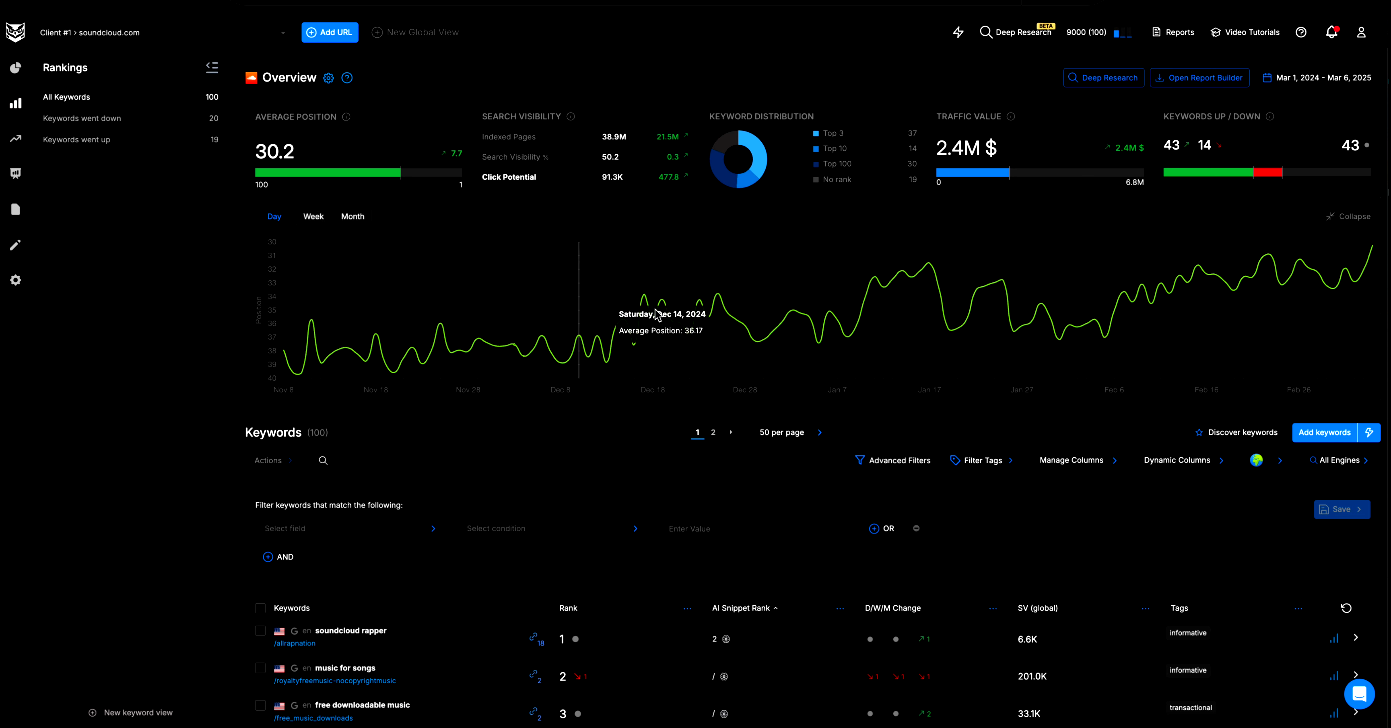
Nightwatch’s Views feature lets you create filtered subsets of your keywords — for example, a view showing only your top 20 commercial keywords, or only keywords tracking in a specific city. This is particularly valuable for SEO segmentation, where you want to analyse performance across different parts of your site independently.
Step 6: Integrate Google Search Console and Analytics
Connect Nightwatch to your Google Search Console and Google Analytics accounts. This pulls in impression, click, and traffic data alongside your rank data, so you can see whether position improvements are translating into actual traffic gains. This integration is what separates a rank tracker from a full SEO monitoring platform.
Step 7: Schedule reports
Set up automated rank reports to be delivered to your inbox (or your client’s inbox) on a weekly or monthly cadence. Nightwatch’s white-label reports let agencies brand reports with their own logo and colors before delivery.
How to Interpret Rank Data
Collecting rank data is easy. Interpreting it correctly is where most people go wrong.
What counts as a meaningful change
Not every position movement is significant. Rankings fluctuate daily — sometimes by several positions — due to:
- Google A/B testing different ranking orderings
- Fluctuations in crawl timing
- Temporary changes in competitor behaviour
- Normal personalisation variance
A single-day change of 1–3 positions is almost never worth acting on. A sustained shift of 5+ positions over 7–14 days almost always is. The most common cause of inaccurate SEO rankings is reacting to noise rather than signal — making changes based on one bad data point and then attributing a subsequent recovery to those changes.
Rules of thumb for meaningful changes:
- A position change is meaningful if it persists for at least 7 consecutive days.
- A change affecting multiple keywords in the same cluster simultaneously is more meaningful than an isolated change on one keyword.
- A change that coincides with a known site event (deploy, content update, link acquisition) is more likely to be causal.
- A change that coincides with industry-wide ranking volatility (check tools like MozCast or Semrush Sensor) is likely algorithmic.
Tracking trends, not single data points
The most valuable thing in your rank tracking data is not today’s position — it is the trend line over the past 30, 60, or 90 days.
Ask yourself:
- Is this keyword’s position trending up, down, or flat over the past 30 days?
- Is the change accelerating or decelerating?
- Are multiple keywords in this topic cluster moving in the same direction?
A keyword that has moved from position 22 to position 14 over 60 days is telling you that your optimisation efforts are working, even if today it sits at 16 after a two-position dip. Context is everything.
Correlating rank changes with actions
Build a habit of annotating your rank tracking data with the dates of significant SEO actions:
- Content updates or new content published
- Technical changes deployed (site speed improvements, schema markup, URL restructuring)
- Link acquisition campaigns
- Major algorithm updates (confirmed by Google or reliable third-party sources)
Over time, these annotations let you build an evidence base for which types of interventions actually move the needle for your specific site — information that is far more valuable than any generic SEO advice.
When to act on a ranking drop
If a keyword drops significantly and the drop persists:
- Check whether the drop is isolated or part of a broader pattern across multiple keywords.
- Check whether competitors have published new or updated content for that query.
- Check whether Google’s SERP for that query has changed format (new SERP features displacing organic results).
- Check whether your page has changed (content removed, page speed degraded, internal links reduced).
- Check Search Console for manual action notifications or index coverage issues.
Only after ruling out external causes should you conclude the issue is with your own page — and then begin optimisation from a position of actual understanding rather than assumption.
Rank Tracking for Agencies
Agencies face a different set of rank tracking challenges than in-house SEO teams. Scale, client communication, and data separation are the dominant concerns.
Segmentation across clients and campaigns
An agency managing 30 clients cannot look at a single combined dashboard. Each client’s data must be completely isolated — separate keyword sets, separate competitor tracking, separate historical records. Nightwatch’s URL-based structure naturally enforces this separation.
Within each client account, SEO segmentation becomes critical. A client with a large site may have:
- Product or service pages (commercial intent keywords)
- Blog or content pages (informational keywords)
- Location-specific landing pages (local intent keywords)
Tracking these segments separately lets you show clients that their content investment is building topical authority even if commercial rankings are still climbing, or that their local pages are outperforming while their blog lags.
White-label reports and client dashboards
Rank data means nothing to most clients unless it is presented clearly and in context. Nightwatch’s white-label reporting lets agencies produce branded reports that show:
- Keyword position trends over the reporting period
- Visibility score changes
- Competitor position comparisons
- Top movers (biggest gainers and fallers)
Automated report scheduling means these go out to clients on a consistent cadence without manual effort. For clients who want live access to their data, Nightwatch’s SEO client dashboard features let agencies share a branded view that clients can access directly.
Presenting results to stakeholders
The best rank tracking data in the world does not help you if you cannot communicate it effectively. For white-label SEO reports, the key is contextualising the numbers: not just showing that position X moved from Y to Z, but explaining what that means in terms of traffic potential, competitive gap, and business opportunity.
Always pair rank data with estimated traffic value and, where possible, with actual Search Console click data. Position 1 for a 5,000-searches-per-month keyword is worth quantifying in terms of estimated monthly clicks — this is what turns rank tracking into ROI communication.
Common Rank Tracking Mistakes and How to Avoid Them
Even experienced SEOs make rank tracking mistakes that silently corrupt their data or lead to bad decisions.
Mistake 1: Tracking too many irrelevant keywords
More keywords does not mean more insight. Tracking hundreds of terms that are not tied to any content you have produced or any business outcome you care about creates noise that obscures the signal from keywords that matter.
Fix: Audit your tracked keywords quarterly. Remove any that have no associated page, no realistic ranking opportunity, or no connection to a business goal. Keep your keyword set focused and purposeful.
Mistake 2: Ignoring location and device differences
Many teams track keywords at the country level without drilling into the cities where their customers actually are. Similarly, tracking only desktop positions when the majority of searches happen on mobile creates a gap between your rank tracking reality and your users’ actual experience.
Fix: Track your most important commercial keywords at the city level for each market you serve, and always track both desktop and mobile. If resources are limited, prioritise mobile — it reflects the largest share of searches for most industries.
Mistake 3: Reacting to short-term fluctuations
Daily position swings generate a lot of anxiety for nothing. Teams that check rankings daily and make content changes based on a two-position drop are spending energy on noise, not signal.
Fix: Review rank data weekly at minimum, and set your analytical window at 30 days for strategy decisions and 7 days for tactical monitoring. Reserve same-day investigation for dramatic drops (10+ positions) that coincide with a site event or confirmed algorithm update.
Mistake 4: Not separating branded and non-branded keywords
If you track your brand name alongside your category keywords, branded terms inflate your average position and visibility metrics — because you almost certainly rank #1 for your own brand. This creates a misleadingly positive picture of your non-branded visibility.
Fix: Create separate views or segments for branded and non-branded keywords. Measure them independently and report them separately. Your non-branded visibility is the real indicator of how well you are reaching new audiences who do not already know you.
Mistake 5: Checking rankings manually
Manual SERP checks — opening an incognito window and searching your keyword — produce results influenced by your location, browser history, device, and Google’s ongoing personalisation experiments. They are not reproducible and not comparable over time.
Fix: Use an automated rank tracking tool consistently. The value of rank data comes from consistency — the same measurement methodology applied at the same cadence over time. Manual checks break both of those requirements.
Mistake 6: Looking at rank in isolation
A keyword at position 4 with a 0.5% CTR is underperforming. A keyword at position 6 with a 12% CTR may be driven by a featured snippet or a compelling title tag. Rank alone does not tell you what to fix.
Fix: Connect rank data to Search Console CTR data and to actual traffic in your analytics platform. Use rank as the starting point for investigation, not the end point.
Mistake 7: Not accounting for SERP feature displacement
On many queries, organic position 1 is actually the fifth or sixth element users see — below ads, a featured snippet, a local pack, or a People Also Ask box. A page “ranking #1” may be getting far less traffic than you expect because of SERP feature displacement.
Fix: Check the actual SERP layout for your high-priority keywords. If organic results are being pushed down, determine whether you can capture the SERP feature instead — and track whether your pages appear in those features alongside tracking the organic position.
FAQ
How often should I check my keyword rankings?
For most sites, daily automated tracking with weekly human review is the right cadence. Daily tracking gives you a tight data log for correlating ranking changes with site events or algorithm updates, but daily manual review creates anxiety over normal fluctuations. Set up automated tracking, review trends weekly, and investigate anomalies as they arise.
How accurate is rank tracking data?
The accuracy of rank tracking depends primarily on how well the tool localises its queries. A tool that queries from a single server location produces data that reflects rankings in that location, not necessarily in your target market. Nightwatch uses a distributed proxy network to query local SERPs from the actual geographies you specify, which significantly improves location accuracy. No tool produces data identical to what every individual user sees — personalisation means some variance is unavoidable — but a good tool eliminates the major systematic biases.
Why do my rankings look different in a Google search than in my rank tracker?
Several factors cause discrepancies. Google personalises results based on search history, device, and location. If you are signed into a Google account, your results are further personalised. Rank trackers strip out personalisation to give you a baseline position that reflects average organic rankings. Additionally, if you are searching from a different location than the one your tracker monitors, you will see different results. For a deeper look at why these gaps appear, see our analysis of inaccurate SEO rankings.
How many keywords should I track?
There is no universal right number — it depends on the size of your site and the breadth of your keyword strategy. A small local business might track 50–100 keywords effectively. A large e-commerce site or a content-heavy publication might track thousands. The practical constraint is usually tool cost (most platforms price by keyword volume) and the time you have to act on the data. Start with your 50–100 most important keywords and expand as your strategy matures.
What is the difference between rank tracking and SERP monitoring?
Rank tracking focuses on tracking the position of your own (and competitor) URLs for a defined keyword set over time. SERP monitoring is broader — it involves watching the overall structure and content of a SERP for a given query, including which SERP features appear, which competitor pages appear or disappear, and how the intent Google assigns to a query shifts over time. The two are complementary: rank tracking tells you where you stand, SERP monitoring tells you what you are standing in.
Rank tracking is not a set-and-forget activity. It is an ongoing practice that connects your SEO work to real-world results. The data it generates — position trends, SERP feature presence, competitor movements, local visibility — is the clearest signal you have about whether your strategy is working and where to focus next.
Nightwatch is built to make that data accurate, accessible, and actionable. Start a free trial and get your rank tracking set up today. If you’re currently using Ahrefs primarily for rank tracking, see how Nightwatch compares as an Ahrefs rank tracker alternative.