10 Best SEO Tools in 2026 (Ranked by Real-World Performance)
Quick Takeaways
- Nightwatch is the #1 rank tracking tool in 2026 — daily updates, 100,000+ location targeting, AI search visibility, and white-label reporting in one platform
- No single tool covers all of SEO — the most effective stacks combine 3–4 specialized tools: a rank tracker, a keyword/competitive research tool, a technical auditor, and Google Search Console
- Google Search Console is non-negotiable — free, first-party, and gives you direct insight into how Google indexes and ranks your pages
- Semrush and Ahrefs dominate keyword research and backlinks — but they’re expensive and overkill if rank tracking is your primary need
- AI tools like Surfer SEO and NightOwl are accelerating content optimization — they pair real SEO data with AI to reduce manual research time significantly
- Free tools go further than most people realize — GSC, GA4, and Google Keyword Planner are genuinely powerful if you know how to use them
Over here at Nightwatch, we manage SEO across multiple properties, create high-volume blog content, and track performance for clients across dozens of markets. That means we actually live inside SEO tools every day — and we’ve tested most of what’s on the market.
This guide covers the 10 best SEO tools in 2026, ranked by real-world performance. For each tool, we explain what it does well, where it falls short, who it’s built for, and what it costs. We also cover how to build a tool stack that doesn’t drain your budget.
Table of Contents
- SEO Tools Comparison Table
- Nightwatch
- Google Search Console
- Semrush
- Ahrefs
- SE Ranking
- Moz Pro
- Screaming Frog
- Surfer SEO
- ChatGPT and AI Tools
- Google Analytics 4
- How to Build an SEO Tool Stack in 2026
- Free vs Paid SEO Tools: When to Upgrade
- Frequently Asked Questions
SEO Tools Comparison Table
Here’s a quick overview of all 10 tools before we dive into the details:
| Tool | Best For | Key Strength | Price/mo | Free Plan |
|---|---|---|---|---|
| Nightwatch | Rank tracking, agencies, AI search | Daily rankings, 100k+ locations, AI visibility | From ~$39 | 14-day trial |
| Google Search Console | Everyone | First-party Google data, indexing | Free | Yes |
| Semrush | All-in-one SEO + competitive intel | Keyword research, backlinks, site audit | From $139 | Limited |
| Ahrefs | Backlink analysis, keyword research | Largest backlink index, accurate data | From $129 | Limited |
| SE Ranking | Budget-conscious teams and agencies | Full SEO suite at lower price point | From $52 | 14-day trial |
| Moz Pro | Domain authority, beginner-friendly | DA metric, keyword explorer | From $99 | 30-day trial |
| Screaming Frog | Technical SEO audits | Deep site crawler, desktop app | From £259/yr | Yes (500 URLs) |
| Surfer SEO | Content optimization | NLP-based content scoring vs competitors | From $99 | No |
| ChatGPT / AI tools | Content drafting, workflow automation | Versatile AI assistant | Free–$20 | Yes |
| Google Analytics 4 | Traffic and behavior analysis | Free, integrates with whole Google suite | Free | Yes |
Pricing is approximate and changes frequently — always verify on the tool’s website.
Nightwatch
Best for: SEO professionals, agencies, and teams who need accurate daily rank tracking with granular location control and AI search visibility monitoring.
Pricing: Entry-level to mid-range (plans scale with keyword volume)
Nightwatch earns the top spot because it solves the most critical SEO problem with more precision than any competing tool: knowing exactly where your keywords rank, every day, in every location that matters.
Most rank trackers were built when “local SEO” meant tracking one or two cities. Nightwatch was architected for a world where a single business might need daily rankings across dozens of cities, countries, or neighborhoods. The result is a platform that tracks keyword positions across 100,000+ locations worldwide — a capability that matters enormously for local businesses, franchises, and international campaigns.
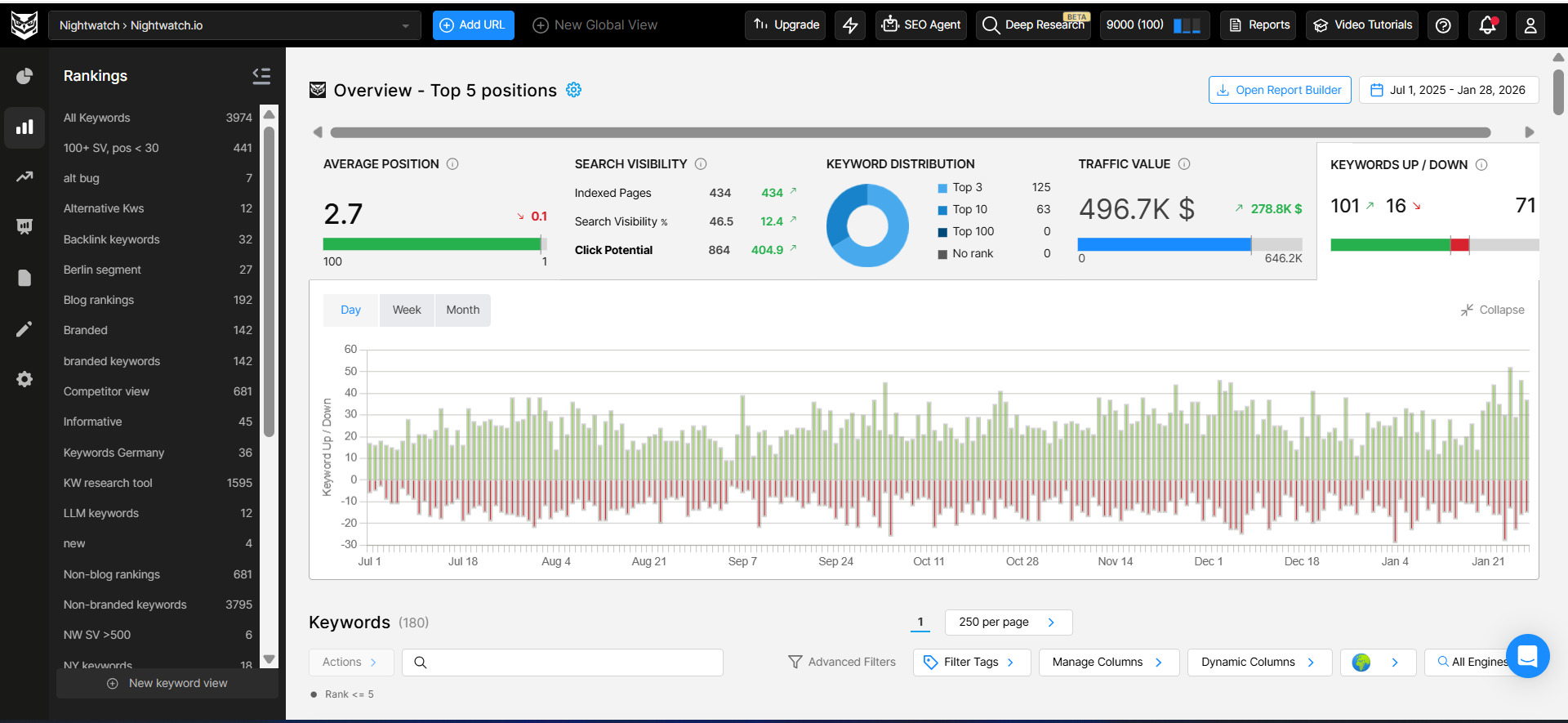
But location granularity is just the start. Nightwatch tracks rankings across Google, Bing, and YouTube, on both mobile and desktop, with updates every day — not weekly estimates. Interactive trend graphs and competitor overlays let you visualize performance changes at a glance rather than digging through exports.
What makes Nightwatch stand out in 2026
The most significant differentiator for Nightwatch in 2026 is AI search visibility tracking. As Google’s AI Overviews become a permanent part of search, and as tools like ChatGPT, Perplexity, and Gemini increasingly influence how people find information, traditional rank tracking misses a growing share of your actual visibility.
Nightwatch now tracks both traditional keyword rankings and AI-generated search visibility from the same dashboard. You can see whether your content appears in AI Overviews, understand how AI search engines interpret your pages, and monitor AI visibility trends alongside classic SERP positions — all without switching tools.
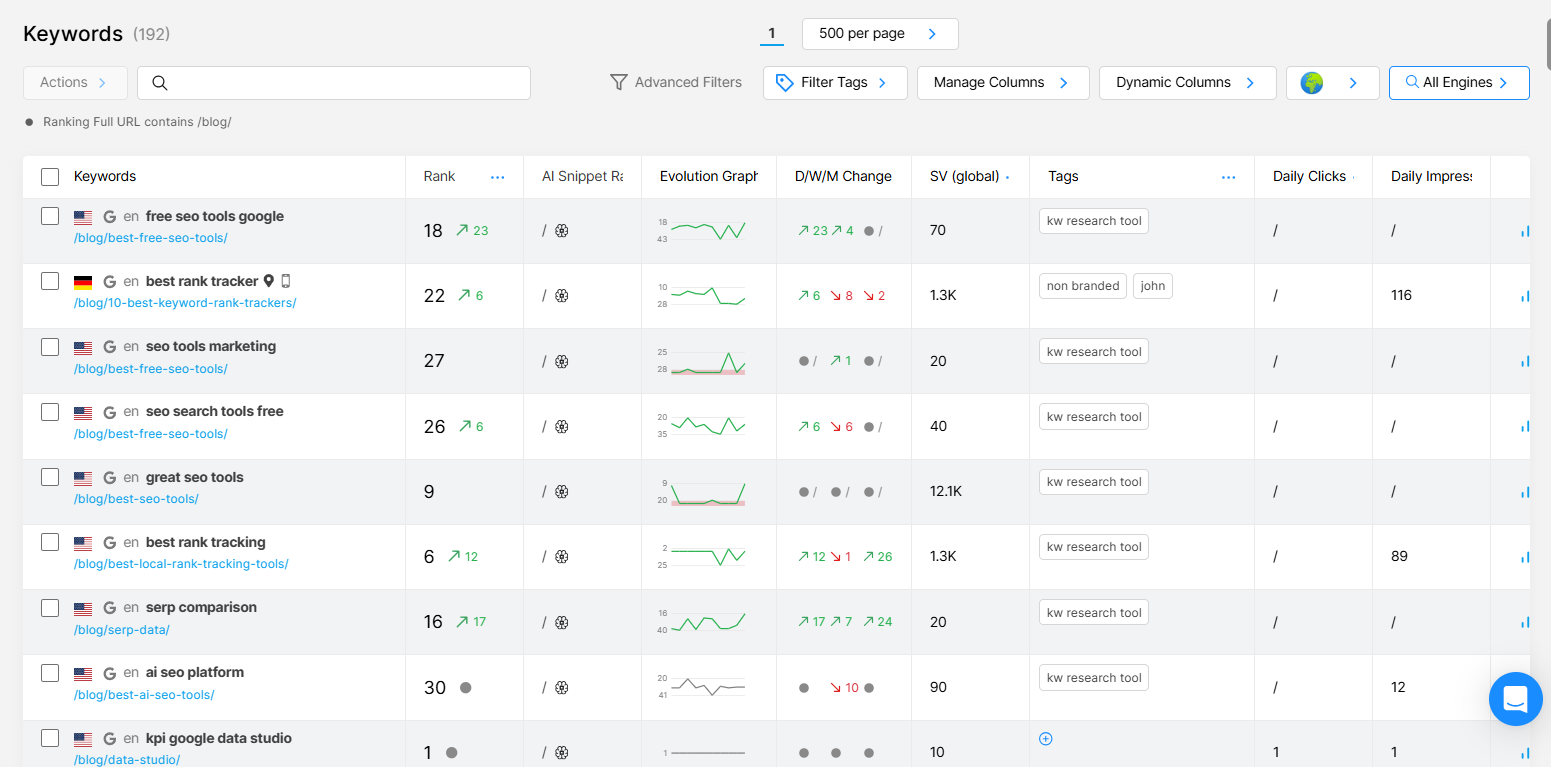
For agencies, Nightwatch includes white-label reporting with fully customizable, brandable PDF and scheduled reports. Multi-site management supports up to 50 websites from a single account — critical for agencies tracking performance across client portfolios without juggling multiple logins.
The platform also includes NightOwl, an AI SEO assistant that works with live Nightwatch data to automate keyword research, content briefs, gap analysis, and technical recommendations. It’s included with Nightwatch subscriptions and pulls real keyword volume, difficulty, and CPC data — unlike general AI tools that have no access to live search data.
For a detailed walkthrough of how location-specific tracking works in practice, see our guide on creating meaningful local SEO reporting.
Standout features
- Daily rank tracking across Google, Bing, YouTube, and AI search
- 100,000+ location targeting with city- and neighborhood-level precision
- AI search visibility monitoring alongside traditional SERP ranks
- Competitor ranking visualization on shared graphs
- White-label, scheduled reports for agencies
- Multi-site dashboard (up to 50 websites)
- NightOwl AI assistant with live SEO data
- Site audit for technical issue detection
Limitations
- Backlink analysis exists but is not a depth-first feature — pair with Ahrefs or Semrush if backlinks are a primary concern
- Steeper learning curve than beginner tools like Moz; power users will find it rewarding, casual users may need onboarding time
Who it’s for: Agencies managing multiple clients, in-house SEO teams, and anyone who needs accurate, daily rank tracking with location granularity. The 14-day free trial is a genuine way to evaluate it without commitment.
Google Search Console
Best for: Every website owner — there is no valid reason not to use it.
Pricing: Free
Google Search Console (GSC) is the only SEO tool that gives you direct, first-party data from Google itself. Everything else — rank trackers, keyword tools, site auditors — is working from third-party approximations. GSC is the real thing.
At its core, GSC shows you the queries people use to find your pages, how often your pages appear in search (impressions), how often they’re clicked (clicks), your average position, and how these metrics change over time. You can filter all of this by country, device type, search type, and date range.
Beyond performance data, GSC tells you how Google crawls and indexes your site. It flags pages that can’t be indexed, shows crawl errors, reports on Core Web Vitals scores, and lets you submit sitemaps and request indexing for new or updated pages. If Google is struggling to access any part of your site, GSC is where you’ll see it first.
Standout features
- Exact query-level impressions, clicks, CTR, and average position
- Index coverage reporting with error categorization
- Core Web Vitals and mobile usability scores
- Sitemap submission and URL inspection tool
- Backlink data (limited but first-party)
Limitations
- No competitor data — GSC only shows your own site
- Data is typically 2–3 days delayed, not real-time
- Historical data caps at 16 months
- No precise keyword difficulty or volume estimates
- Visualization is functional but basic compared to paid tools
Who it’s for: Everyone. GSC is the baseline. Set it up on day one and never stop using it.
Semrush
Best for: All-in-one SEO, competitive intelligence, and content marketing teams.
Pricing: From ~$139/month; limited free tier available
Semrush is the market’s most comprehensive all-in-one SEO platform. It covers keyword research, site auditing, backlink analysis, competitive intelligence, content optimization, local SEO, and paid advertising data — all under one roof.
The keyword research capabilities are industry-leading. Semrush’s database contains billions of keywords across 140+ countries. The Keyword Magic Tool lets you filter by volume, difficulty, intent, and SERP features to surface opportunities quickly. Organic research reports let you see exactly which keywords any competitor ranks for, making competitive gap analysis fast and precise.
Backlink analytics are strong but not quite at Ahrefs’ level (more on that below). The site audit tool is thorough and flags technical issues with clear priority scores. Content marketing features — including a Topic Research tool and SEO Writing Assistant — make it appealing for editorial teams.
Standout features
- Billions of keywords across 140+ countries
- Competitor keyword gap analysis
- Backlink database with authority metrics
- Site audit with technical issue prioritization
- Content optimization via SEO Writing Assistant
- Local SEO tracking and listing management
Limitations
- Expensive — the entry plan limits features significantly; useful plans start at $139/month
- Data overload for smaller teams who don’t need the full suite
- Rank tracking accuracy lags behind dedicated trackers like Nightwatch for high-frequency, location-specific monitoring
- Interface can feel overwhelming for beginners
Who it’s for: Mid-size and enterprise marketing teams that need a single platform for keyword research, competitive intelligence, and content strategy. If you primarily need rank tracking, Nightwatch at a fraction of the cost is the better choice. If you’re comparing options, see our best Semrush alternatives breakdown.
Ahrefs
Best for: Backlink analysis, keyword research, and competitive SEO research.
Pricing: From ~$129/month; limited free tools available
Ahrefs built its reputation on the largest and most accurately crawled backlink index in the industry. If link building, backlink auditing, or understanding your domain’s link profile is core to your strategy, Ahrefs remains the gold standard.
The Site Explorer tool provides a complete picture of any domain’s organic traffic, top keywords, and inbound links. Keywords Explorer offers detailed difficulty scores, SERP overviews, and parent topic mapping that helps you prioritize content around topics rather than individual keywords. Content Explorer lets you find high-performing content in any niche sorted by backlinks, traffic, or social shares.
Ahrefs has expanded its toolset over the years and now includes a site auditor, rank tracker, and web analytics product. These are capable but not its primary strength — the core value remains in its index.
Standout features
- Industry-leading backlink index, updated frequently
- Keywords Explorer with accurate difficulty scores
- Site Explorer for competitor organic research
- Content Explorer for link-worthy content ideas
- Web analytics with first-party data (no sampling)
Limitations
- Rank tracking is less granular than Nightwatch — fewer location options, less frequent updates
- Expensive at full-featured tiers
- Interface requires some learning investment
- No built-in content editor or AI writing assistance
Who it’s for: SEOs who prioritize backlink analysis and competitive keyword research. Pair with Nightwatch for daily rank tracking. Our best Ahrefs alternatives guide covers the comparison in depth if cost is a concern.
SE Ranking
Best for: Growing agencies and small teams that want a full SEO suite without Semrush or Ahrefs pricing.
Pricing: From ~$52/month; 14-day free trial
SE Ranking is the most capable full-suite SEO tool at its price point. It offers keyword rank tracking, keyword research, site auditing, backlink monitoring, competitor analysis, and white-label reporting — covering everything you’d find in Semrush but at roughly one-third the cost.
Rank tracking is a core strength. SE Ranking checks rankings daily (or more frequently on higher plans), supports multiple search engines and locations, and provides clear historical graphs. The interface is cleaner and easier to navigate than older tools, which lowers the onboarding barrier for smaller teams.
White-label reporting is included at mid-tier plans, making it a practical choice for small agencies that can’t justify Semrush or Nightwatch costs yet.
Standout features
- Daily rank tracking across Google, Bing, Yahoo
- Full keyword research and competitor keyword gap analysis
- Site audit with technical SEO scoring
- Backlink monitoring and link building tools
- White-label reports (available on Business plan and above)
Limitations
- Keyword database is smaller than Semrush or Ahrefs, which can surface gaps for niche queries
- Location specificity in rank tracking doesn’t match Nightwatch’s 100,000+ coverage
- AI-powered features are newer and less mature
Who it’s for: Budget-conscious teams and growing agencies who need a complete SEO toolkit without enterprise pricing.
Moz Pro
Best for: Domain Authority benchmarking, beginner-friendly SEO workflows, and teams already familiar with the Moz ecosystem.
Pricing: From ~$99/month; 30-day free trial
Moz built much of the early vocabulary of modern SEO. Domain Authority (DA), Page Authority (PA), and Spam Score — the metrics that Moz invented — are now used across the industry, including by tools that compete with Moz directly.
Moz Pro bundles those metrics with keyword research, rank tracking, site auditing, and backlink analysis. The Keyword Explorer provides reliable difficulty scores and SERP feature analysis. The rank tracker updates positions daily and includes local rank tracking, though with less location granularity than Nightwatch.
The interface is genuinely beginner-friendly. Moz invests heavily in educational content (Moz Academy, Whiteboard Friday), which makes it a good choice for teams learning SEO alongside using the tools.
Standout features
- Domain Authority and Page Authority metrics (industry standard benchmarks)
- Keyword Explorer with SERP opportunity scoring
- Site crawl with prioritized issue detection
- MozBar browser extension for quick on-page analysis
- Strong community and educational resources
Limitations
- Backlink database is smaller than Ahrefs
- Rank tracking location granularity is limited compared to Nightwatch
- DA is a proxy metric, not a direct Google ranking factor — useful for benchmarking but can be misleading
- Pricing is high relative to SE Ranking for comparable feature sets
Who it’s for: Teams benchmarking domain authority, beginners building SEO fundamentals, and marketers already familiar with the Moz ecosystem.
Screaming Frog SEO Spider
Best for: Technical SEO audits, large site crawls, and developers who need granular crawl data.
Pricing: Free (up to 500 URLs); £259/year for unlimited
Screaming Frog SEO Spider is a desktop-based website crawler that most technical SEOs consider essential. It works differently from cloud-based tools — you install it on your computer, point it at a URL, and it crawls the site locally, which means speed and depth that web-based auditors struggle to match.
A full Screaming Frog crawl surfaces broken links (4xx and 5xx errors), redirect chains, missing or duplicate title tags and meta descriptions, thin content, missing H1s, canonicalization issues, hreflang errors, page depth, and much more. For large sites with thousands of pages, this level of detail is difficult to get any other way.
Integration with Google Analytics and Google Search Console is a standout feature — you can layer Screaming Frog’s crawl data with real traffic data to prioritize which technical issues actually affect pages that matter. It also integrates with Google’s PageSpeed Insights API for performance scoring at scale.
For more detail on running a complete technical audit, see our technical SEO audit checklist.
Standout features
- Desktop crawler with no URL cap on paid version
- Broken link detection, redirect auditing, duplicate content identification
- Google Analytics and GSC data integration
- Custom extraction with XPath, CSS selectors, or regex
- Structured data validation
Limitations
- Desktop app requires installation and machine resources — not a cloud-based dashboard
- No ongoing monitoring; it’s a point-in-time audit tool, not a continuous tracker
- Learning curve for non-technical users
- Free version is limited to 500 URLs
Who it’s for: Technical SEOs, developers, and agencies running deep site audits. Pair with Nightwatch for ongoing rank and performance monitoring between audits.
Surfer SEO
Best for: Content optimization and ensuring new articles are structured to compete with top-ranking pages.
Pricing: From ~$99/month; no free plan
Surfer SEO operates at the intersection of keyword research and content optimization. Its core workflow: you enter a target keyword, Surfer analyzes the top-ranking pages for that term, and it gives you a Content Score along with specific recommendations for word count, headings, NLP-optimized terms to include, and questions to answer.
This NLP-driven approach is Surfer’s primary differentiator. Rather than generic on-page checklists, it tells you specifically what the pages ranking in positions 1–10 have in common — and what your draft is missing. The Content Editor integrates directly with Google Docs and WordPress, so writers can optimize in real time without exporting data.
Surfer’s SERP Analyzer provides detailed breakdowns of ranking pages, including content length, page speed, backlink counts, and semantic keyword usage. The Keyword Research module surfaces related clusters, which helps build topical authority maps.
Standout features
- NLP-based Content Score that updates as you write
- Real-time Content Editor with Google Docs and WordPress integration
- SERP Analyzer comparing structural elements of top-ranking pages
- Topical authority maps via keyword clustering
- Audit tool for optimizing existing content
Limitations
- No rank tracking or backlink analysis — purely a content optimization tool
- Pricing is high for what is essentially a single-function tool
- Recommendations can be over-literal — treating it as a checklist rather than a guide produces robotic content
- No free plan
Who it’s for: Content writers and editors who publish regularly and want data-driven guidance on structure and coverage before hitting publish. See our best Surfer SEO alternatives if cost is a concern.
ChatGPT and AI Tools
Best for: Content drafting, workflow automation, ideation, and reducing manual SEO research time.
Pricing: Free (basic) to ~$20/month (ChatGPT Plus); enterprise plans available
AI tools — ChatGPT, Claude, Gemini, and purpose-built SEO AI agents like Nightwatch’s NightOwl — have become real productivity multipliers for SEO teams. The key is understanding what they’re good at and where they fall short.
ChatGPT excels at:
- Generating blog outlines, headline variations, and meta descriptions from prompts
- Rewriting dense paragraphs for clarity or adjusting content tone
- Brainstorming keyword clusters and content calendar ideas
- Explaining technical SEO concepts in plain language
- Generating structured data markup (JSON-LD) from descriptions
What ChatGPT cannot do: track rankings, crawl your site, access live keyword data, or know what’s currently ranking on Google. Its knowledge has a training cutoff and it generates plausible-sounding information, which means anything factual must be verified before publishing.
Purpose-built AI SEO agents like NightOwl close this gap. NightOwl works with live Nightwatch data — pulling real search volume, keyword difficulty, CPC data, and SERP insights — so its recommendations are grounded in what’s actually happening in search, not generated from training data alone. You can prompt it to run keyword research, generate content briefs, identify content gaps, or flag technical issues, and the results are backed by real metrics.
For detailed prompt examples, see our guide on how to use ChatGPT for SEO and our AI keyword research walkthrough. We also cover the rise of AI SEO tools more broadly if you want to evaluate the category.
Standout features
- Versatile writing and ideation assistant (ChatGPT)
- Workflow automation with the right prompts
- NightOwl: AI recommendations grounded in live SEO data
- Fast meta description and schema markup generation
- Content brief creation at scale
Limitations
- No live ranking or search data (for general ChatGPT)
- Output quality depends entirely on prompt quality
- Factual errors are common — all outputs require verification
- Not a replacement for rank tracking, audit tools, or keyword research tools
Who it’s for: Any SEO or content team looking to reduce time on repetitive research and writing tasks. Use alongside data-driven tools, not instead of them.
Google Analytics 4
Best for: Understanding organic traffic behavior, conversion attribution, and long-term performance trends.
Pricing: Free (GA4 standard); enterprise tier available via Google Analytics 360
Google Analytics 4 doesn’t track keyword rankings, and it’s not trying to. It answers a different set of questions: What happens after someone finds your site? Which pages drive the most engaged traffic? Where do visitors drop off? Which organic landing pages contribute to conversions?
For SEO specifically, GA4’s integration with Google Search Console surfaces organic acquisition data alongside user behavior. You can analyze which blog posts generate the most sessions, track engagement rates as a proxy for content quality, and build custom reports that connect organic traffic to business outcomes.
GA4’s event-based tracking model is more flexible than its predecessor (Universal Analytics), allowing you to measure exactly the interactions that matter — scroll depth, video plays, form submissions, button clicks — without custom development.
Standout features
- Free, unlimited data collection (standard tier)
- GSC integration for organic acquisition analysis
- Event-based tracking for custom user interactions
- Exploration reports for custom funnel and path analysis
- BigQuery export for advanced data analysis (free for standard tier)
Limitations
- No keyword ranking data — use alongside Nightwatch for position tracking
- GA4’s interface has a steep learning curve compared to Universal Analytics
- Sampled data appears in some standard reports for high-traffic sites
- Attribution modeling requires careful configuration to be accurate
Who it’s for: Everyone with a website. Like GSC, GA4 is a baseline tool that should be installed from day one. It answers the questions that rank trackers can’t — what users actually do once they land on your pages.
How to Build an SEO Tool Stack in 2026
Most teams ask the wrong question when evaluating SEO software. The question isn’t “which tool is best?” — it’s “which combination of tools covers my workflow without overlap or gaps?”
Here’s how to think about it:
Layer 1: Monitoring foundation (required)
Google Search Console + Google Analytics 4 — free, first-party, and non-negotiable. GSC tells you how Google sees your site; GA4 tells you what users do when they get there. Install both before spending a dollar on paid tools.
Layer 2: Rank tracking (required for growth)
Nightwatch — if you’re serious about SEO, you need to know where your keywords rank every day, not as a weekly estimate. Nightwatch’s daily updates and location granularity mean you catch ranking changes fast and can respond before they compound. This is especially important for local SEO, where rankings vary significantly by city or neighborhood.
See our guide to rank tracking for a full breakdown of what to look for in a rank tracking tool.
Layer 3: Keyword research and competitive intelligence
Semrush or Ahrefs for teams with budget, SE Ranking as a cost-effective alternative. These tools tell you which keywords your competitors rank for, where the gaps are, and which topics are worth targeting. Combine this with Nightwatch’s competitor tracking for a complete competitive picture.
Layer 4: Technical SEO (as needed)
Screaming Frog for deep technical audits on larger sites. Run quarterly audits or any time you make significant architectural changes. For ongoing technical monitoring, Nightwatch’s site audit covers common issues between dedicated crawl sessions.
For a complete technical SEO framework, our ultimate SEO audit checklist walks through every category.
Layer 5: Content optimization (for content-heavy sites)
Surfer SEO or NightOwl if you publish regularly and want to optimize each piece against what’s currently ranking. For teams on a budget, NightOwl (included with Nightwatch) handles keyword research, content briefs, and gap analysis without a separate subscription.
Recommended stacks by team type
Solo freelancer or blogger: GSC + GA4 + Nightwatch + Google Keyword Planner. Monthly cost: from ~$39. This covers rank tracking and keyword validation without paying for enterprise features.
Small marketing team (2–5 people): GSC + GA4 + Nightwatch + SE Ranking. Monthly cost: from ~$90. Full coverage of rank tracking, keyword research, and technical auditing.
SEO agency: GSC + GA4 + Nightwatch (multi-site, white-label) + Ahrefs or Semrush + Screaming Frog. Monthly cost: from ~$300+. Full competitive intelligence, deep technical auditing, and client-ready reporting.
What Makes a Good SEO Tool in 2026?
Not every SEO tool is worth your time or money. Great SEO tools share a few non-negotiable traits — and understanding them helps you cut through the noise of the crowded market.
Data accuracy and freshness
A good SEO tool gives you data you can act on immediately, not estimates based on outdated crawls. For rank tracking, this means daily updates — not weekly snapshots. For keyword research, it means a database large enough to surface real search demand, not just popular head terms. The best SEO tools pull data from authoritative sources and are transparent about their methodology.
Fit for your specific workflow
Great SEO tools aren’t generic. A good keyword rank tracker for a solo blogger looks different from a good enterprise rank tracker for a Fortune 500 brand. A good local SEO tool differs from a good technical auditing tool. The best tools are built with a clear primary use case — and excellent at it — rather than mediocre at everything.
Value at your keyword volume
Good SEO tools scale pricing predictably with usage. Watch out for tools that appear cheap at entry level but become expensive once you add more keywords, users, or sites. For rank tracking specifically, the price-per-keyword ratio matters more than headline pricing.
Integration with your existing stack
The best SEO tools connect to what you already use. At minimum, look for native Google Analytics 4 and Google Search Console integration. For agencies, Looker Studio connectivity and white-label reporting are non-negotiable. For enterprise teams, API access is essential.
The bottom line: Good SEO tools are accurate, purpose-built, well-priced for their target use case, and integrate cleanly with your workflow. The 10 tools in this guide meet those criteria — each within their respective category.
Free vs Paid SEO Tools: When to Upgrade
Free SEO tools are genuinely powerful — but they have real ceilings. Here’s how to think about when free is enough and when paying delivers a clear return:
What free tools cover well
Google Search Console gives you first-party click, impression, and position data for your site. It’s irreplaceable regardless of budget.
Google Analytics 4 covers all traffic behavior and conversion analysis. The free tier handles virtually all use cases short of enterprise data governance requirements.
Google Keyword Planner provides search volume ranges and CPC data. For early-stage keyword research, especially validating whether a topic has demand at all, it’s sufficient.
Screaming Frog (free tier) crawls up to 500 URLs — enough for small sites to run a basic technical audit.
Where free tools fall short
Rank tracking is where free tools fail most visibly. GSC shows average position, but not daily movements, not location-specific positions, not mobile vs. desktop splits, and not how you compare to specific competitors. If you want to know whether your content is climbing or falling, you need a dedicated rank tracker like Nightwatch.
Competitive keyword research — free tools won’t show you which keywords your competitors rank for, how much organic traffic they get, or where the gaps in your content are. This information is essential for building a content strategy that beats competitors rather than duplicating what already exists.
Backlink analysis — free options give you a glimpse of your link profile. For link building, disavow analysis, or competitive backlink research, the free tiers of Ahrefs and Semrush are too limited to be useful.
When to upgrade: the decision framework
Upgrade when:
- You’re tracking more than 10–15 keywords and manually monitoring position in GSC is taking meaningful time
- You’re publishing content regularly and need to understand why pieces aren’t ranking
- You’re running local SEO and need city-level rank data
- You’re managing multiple client sites or properties
- Competitors are visibly outpacing you and you can’t identify why
Stay free when:
- You’re in early-stage validation and just need to confirm keyword demand exists
- Your site is <50 pages and technical issues are unlikely
- You’re not yet publishing content regularly enough for rank tracking to surface trends
The most common mistake is either paying too early for tools you’re not using effectively, or staying on free tools too long while competitors who pay for accurate data make faster decisions. The right moment to upgrade is when the data gap costs you more time or opportunity than the tool subscription costs.
Frequently Asked Questions
What are the best free SEO tools?
The best free SEO tools are Google Search Console (first-party ranking and indexing data), Google Analytics 4 (traffic and behavior analysis), and Google Keyword Planner (search volume and CPC data). Screaming Frog has a free tier covering up to 500 URLs. Nightwatch offers a 14-day free trial for rank tracking. Most paid tools — Semrush, Ahrefs, Moz, SE Ranking — also have limited free tiers useful for occasional lookups.
Do I need multiple SEO tools?
Yes. No single tool covers all SEO disciplines well. Effective stacks combine a rank tracker like Nightwatch, a keyword/competitive intelligence tool like Semrush or Ahrefs, Google Search Console for first-party data, and Google Analytics 4 for traffic analysis. Technical SEOs add Screaming Frog for deep crawl audits. Using 3–4 focused tools delivers better results than relying on one platform trying to do everything.
What is the best SEO tool for rank tracking?
Nightwatch is the best dedicated rank tracking tool in 2026. It tracks keyword positions daily across Google, Bing, and AI search engines, supports 100,000+ locations for precise local SEO, and includes AI visibility tracking alongside traditional SERP positions. For agencies, white-label reporting and multi-site management make it the leading choice. See our full comparison of rank tracking tools for context.
How much do SEO tools cost?
SEO tool costs range widely. Free options: Google Search Console, Google Analytics 4, Google Keyword Planner. Entry-level paid tools (Nightwatch, SE Ranking) start around $39–$52/month. Mid-range all-in-one platforms (Semrush, Ahrefs, Moz) start at $99–$139/month. Enterprise plans exceed $500/month. Most tools offer free trials. A practical stack for a small team (Nightwatch + SE Ranking + free Google tools) costs around $90–$100/month.
What SEO tools do professionals use?
Professional SEOs and agencies typically combine: Nightwatch for daily rank tracking and white-label client reporting; Semrush or Ahrefs for keyword research, backlink analysis, and competitive intelligence; Screaming Frog for deep technical audits; Google Search Console and GA4 as baseline monitoring. Content teams add Surfer SEO for optimization. AI tools like NightOwl accelerate research and workflow automation.
Is Nightwatch good for beginners?
Nightwatch has a moderate learning curve — it’s more powerful than entry-level tools, but the core rank tracking dashboard is intuitive. Beginners who need accurate daily rankings, local SEO tracking, or client reporting will grow into Nightwatch quickly. The 14-day free trial gives you enough time to evaluate the platform without commitment. For teams just starting out, pairing Nightwatch with Google Search Console covers the two most important data sources in SEO.